A one-to-many relationship lets one record own or group several records of another type, while each related record points back to one parent. A venue can have many rooms, but each room belongs to one venue. In a relational database, the child table stores the parent record’s ID as a foreign key. section 4.7
In Django, define the relationship on the many side with a ForeignKey. A Room model can hold venue = models.ForeignKey(Venue, on_delete=models.CASCADE), making each Room refer to one Venue. Create and apply migrations after adding the models. section 4.7.1
Once objects exist, follow the relationship in either direction:
- From a room to its venue: red.venue returns the associated Venue object, including its ID and name. section 4.7.1
- From a venue to its rooms: cbgb.room_set.all() returns the related Room objects. section 4.7.1
- Filter through the relationship with double underscores, such as room__name="Red" or room__name__startswith="R" when querying venues. section 4.7.1
Do not confuse this with many-to-many. A foreign key directly represents one parent and many children; a many-to-many relationship needs a dedicated table containing foreign keys to both kinds of object. section 4.7 section 4.12
Venue with two rooms
Create a Venue named CBGB, then create Red and Blue Room objects with venue=cbgb. Both rooms resolve back to CBGB, while cbgb.room_set.all() returns Red and Blue. section 4.7.1
Listing 4.13 Venue and Room models and their one-to-many relationship
# RiffMates/bands/models.py
...
class Venue(models.Model):
    name = models.CharField(max_length=20)

    def __str__(self):
        return f"Venue(id={self.id}, name={self.name})"


class Room(models.Model):
    name = models.CharField(max_length=20)
    venue = models.ForeignKey(Venue, on_delete=models.CASCADE)  #1

    def __str__(self):
        return f"Room(id={self.id}, name={self.name})"
Inspect the paired Venue and Room models to see the ForeignKey placed on the Room, the many side of the relationship. section 4.7.1
Figure 4.9 One-to-many vs. many-to-many relationships
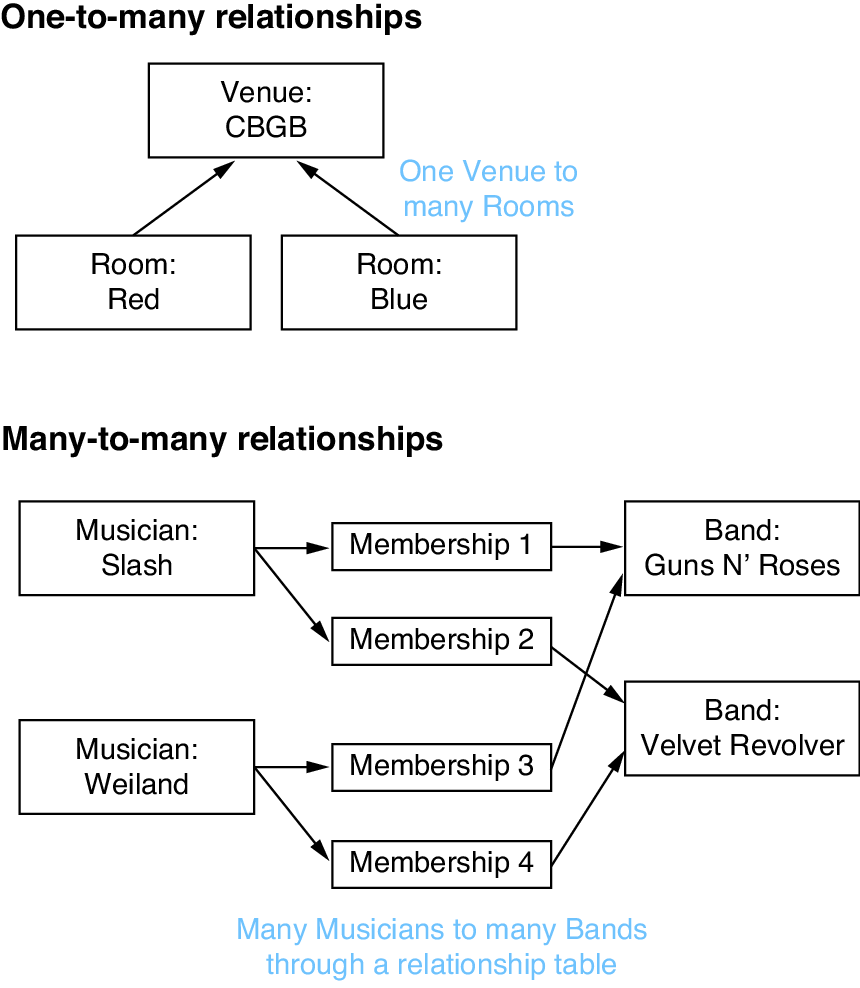
Compare the direct foreign-key shape of one-to-many with the separate relationship-table shape of many-to-many. section 4.7











