An API key is a secret credential an application supplies when calling a remote service. The service can use it to associate a request with an account. In an ASP.NET Core application, keep the key in configuration rather than hardcoding it: you can then change it at deployment without recompiling, and you reduce the risk of committing it to source control. section 10.1 section 33.4
Choose where to keep the key before writing code that uses it:
- For local development, use User Secrets, which stores values outside the project folder. For example: `dotnet user-secrets set "MapSettings:GoogleMapsApiKey" "<your-key>"`. section 10.2.3
- For production, use an environment variable rather than putting the key in `appsettings.json`. Neither environment variables nor User Secrets encrypts the value; their main benefit here is avoiding accidental commits. section 10.2.3
- Do not commit keys even to a private repository. For encrypted storage, consider a service such as Azure Key Vault; its connection details still need to be stored. section 10.2.3
Attach a key to outgoing requests
An exchange-rate client can use a custom `DelegatingHandler` to read its configured API key and add an `API-KEY` header before each request is sent. Register the handler with dependency injection, then add it to the typed client using `AddHttpMessageHandler<ApiKeyMessageHandler>()`. This keeps repeated header-setting code out of individual API calls. More complex APIs may use JWTs instead of API keys. section 33.4
Figure 33.6 You can use a custom HttpMessageHandler to modify requests before they’re sent to third-party APIs. Every request passes through the custom handler before the final handler (the HttpClientHandler) sends the request to the HTTP API. After the response is received, each handler gets a chance to inspect and modify the response.
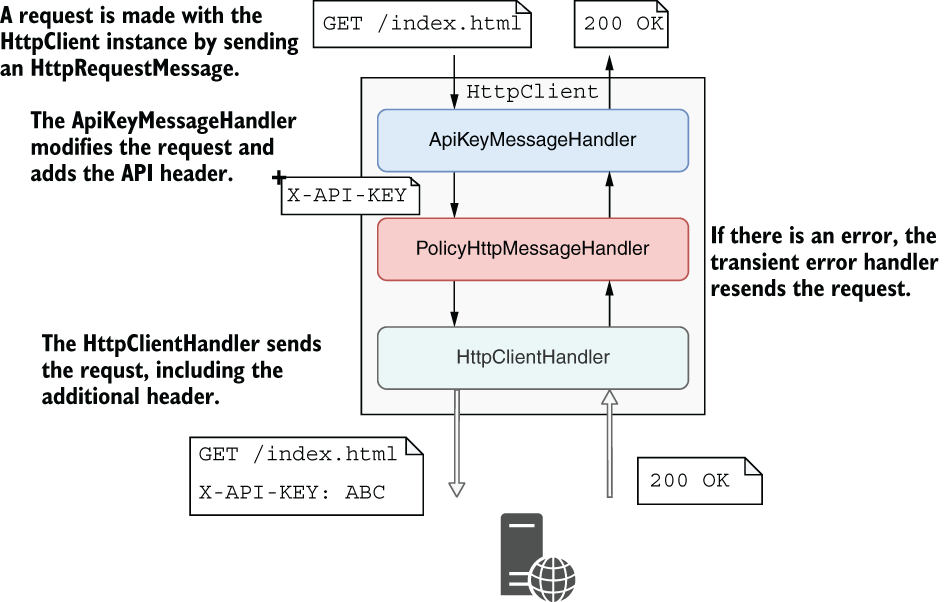
Follow the outgoing request through the custom handler: it adds the header before the final handler sends the request to the API. section 33.4












