An API key is a credential supplied by a user or application to authorize requests to an external AI service. User-provided keys act on the user’s behalf and require a deliberate storage and request architecture. section 9.4.1 section 9.4.3
Choose the handling model according to who owns the credential and where requests execute:
- Store application-owned keys in private environment variables, never hardcode them, and route authenticated provider requests through server-side code. section 9.4.1 section 9.4.2
- Encrypt user-provided keys before storing them in a secure database, treating them like passwords and using server routes as intermediaries. section 9.4.3
- Avoid placing sensitive keys in client code or variables prefixed with NEXT_PUBLIC_; browser-visible keys can be inspected, abused, or disabled by providers. section 2.8.3 section 9.4.3
- Monitor usage and control access with authentication, rate limiting, and provider dashboards to reduce unexpected charges and abuse. section 9.4.3 section 9.2
Server-side environment configuration
For a Next.js application, place OPENAI_API_KEY in .env.local or deployment runtime configuration, then read it from server-side code through process.env.OPENAI_API_KEY. Do not rename it with the NEXT_PUBLIC_ prefix. OpenAI integrations may require billing and available credits. section 2.8.3 section 2.7.1
Figure 9.5 OpenAI API usage dashboard displaying metrics for a GPT-4 model instance, showing API requests and total token usage. The dashboard interface includes a navigation sidebar with options for monitoring various aspects of the API deployment.
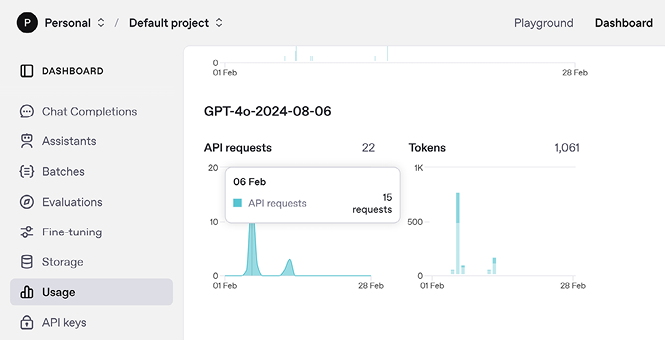
Inspect API requests and token usage through a provider usage dashboard when tracking consumption and investigating unexpected activity. section 9.4.3












