An API key is a credential string used to authenticate or authorize requests to an external API. API documentation specifies how to generate the key and include it when calling an endpoint. section 7.1
In Snowflake external network access, store the key in a secret rather than embedding it in procedure logic. The secret is allowed by an external access integration, which is passed to a Python UDF or stored procedure calling the API. section 7.1 section 7.5
A practical API-key integration follows these steps:
- Read the endpoint documentation, identify the required authentication method, and obtain the key by registering an application when required. section 7.1
- Create a Snowflake secret containing the key, then include that secret in an external access integration alongside a network rule for the API host. section 7.1
- Grant users the required USAGE privilege on the integration and READ privilege on the secret before they call the API from Snowflake. section 7.5
Calling Yelp from Snowflake
A pipeline retrieving bakery reviews uses Yelp’s Reviews endpoint and a private API key. The key is stored as YELP_API_TOKEN, while YELP_API_NETWORK_RULE allows traffic to api.yelp.com; both are referenced by YELP_API_INTEGRATION. section 7.1
Figure 7.1 Snowflake's external network access architecture consists of a network rule pointing to an external network location and a secret containing a token, key, or password. The network rule and secret are included as parameters when creating an external access integration object. This object is passed as a parameter to a Python function or stored procedure so that the function or procedure can call the external API.
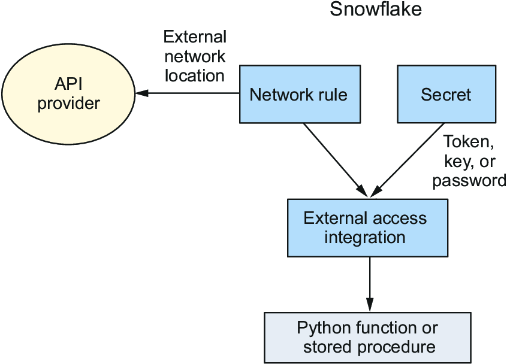
Use the architecture figure to trace how the API key moves from a secret into an external access integration and then into a Python function or stored procedure. section 7.1












