A Pareto front is the pool of candidate prompts that each score highest on at least one validation example. A prompt dominates another when it scores higher on every example; dominated prompts can be discarded. section 6.5.2
During GEPA prompt optimization, the front guides which candidates can produce the next prompts:
- Choose a prompt for mutation, or choose two for crossover. Prompts that lead on more examples are selected more often, while other front members may still be explored. section 6.5.2
Mixed results keep both prompts in play
Across five validation examples, Prompt 2 scores higher than Prompt 1 on four but lower on one. Neither dominates the other, so both remain on the Pareto front. section 6.5.2
Figure 6.4 The first four steps in generating and evaluating candidate prompts in the GEPA optimizer. The nodes indicate single prompts. Those in gray are in the Pareto front and may be used to create subsequent candidate prompts. After step 1, we have a single prompt, which is the prompt related to the DSPy program passed to the GEPA optimizer. In step 2, we mutate this prompt, creating Prompt 2, and evaluate it on the validation set. As long as this prompt is the top-performing prompt on at least one example in the validation set, it becomes part of the Pareto front. In step 3, we can either mutate or combine prompts from the Pareto front. In this case, we combine Prompts 1 and 2, creating Prompt 3. This prompt is the top-scoring prompt on at least one example, so it enters the Pareto front, but Prompt 1 is no longer part of the Pareto front. In step 4, we can again either mutate or combine elements of the Pareto front. In this case, we mutate Prompt 3, creating Prompt 4, which also becomes part of the Pareto front.
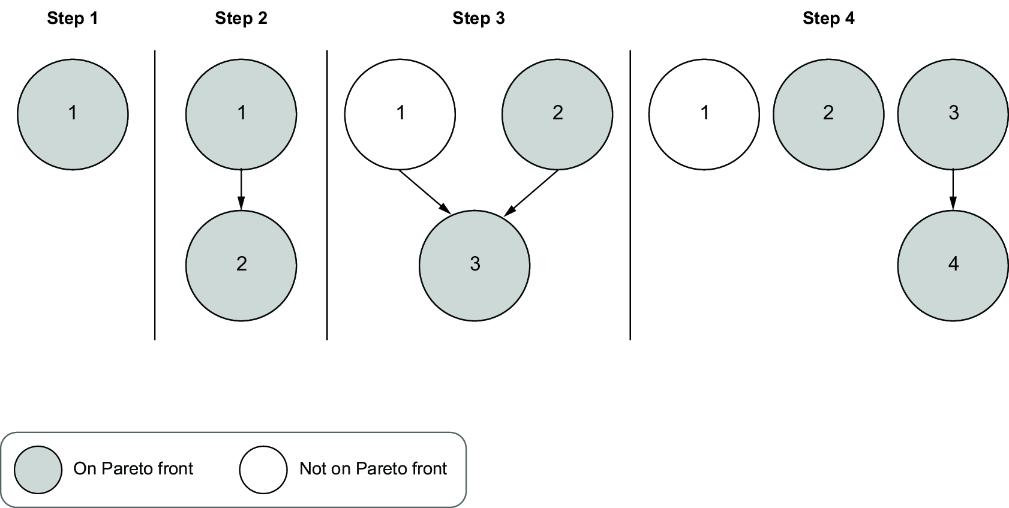
Follow four optimization steps as candidate prompts are mutated or combined and the Pareto front changes. section 6.5.2


