Pose is the spatial arrangement of a subject’s body, face, and hands. Prompting can usually manage broad actions such as sitting or standing, but it struggles when you need an exact configuration. Open Pose supplies that missing blueprint for image generation. section 12.4
A practical workflow starts with a reference image in ComfyUI. The DWPose Estimator extracts a pose structure, producing a general body layout plus detailed face and hand information. Feed that result to an Open Pose ControlNet, then generate a new subject while preserving the selected arrangement. section 12.4.1
Use the extracted pose selectively:
- Keep body pose, face, and hands when the new character should closely match the reference. section 12.4.1
- Disable facial or hand details when you want a different expression or do not need those features reused. section 12.4.1
- Treat pose variety as useful training data: images showing different angles, distances, activities, and positions help a subject appear in varied poses. section 13.2.1
From statue to cyber ninja
Take a photograph of a statue of Patanjali meditating, extract its pose with DWPose, and use Open Pose ControlNet to generate a futuristic cyber ninja meditating in a garden with the same configuration. section 12.4 section 12.4.1
Figure 12.19 Statue of Patanjali meditating (attribution: Wikipedia user Alokprasad)
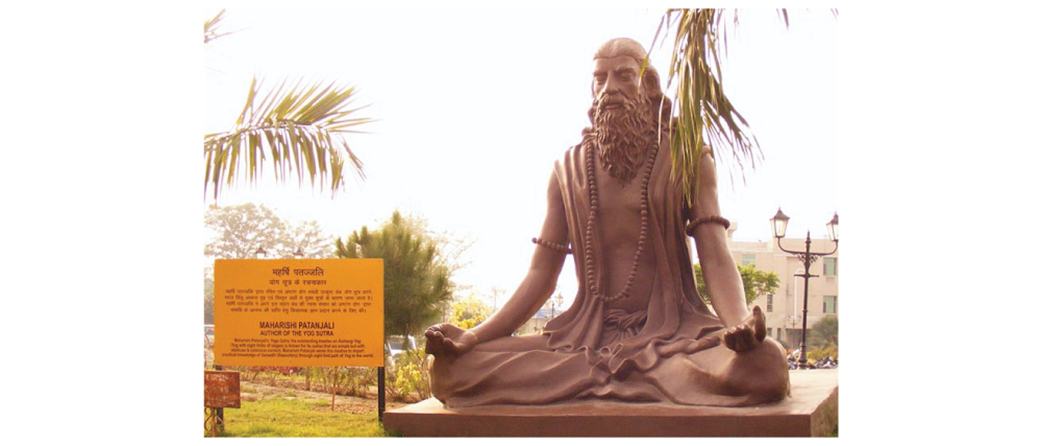
Inspect the meditation statue used as the reference before extracting its pose. section 12.4