A survival game needs to find balance data for each enemy type. A map, called a dictionary in C#, stores key/value pairs: an enemy name such as “Zombie” can be the key for its data. That is convenient when the caller knows a name rather than an array index. section 10.0 section 10.1
A dictionary lookup is O(1) in complexity, but it is not one memory access. C# hashes the key, reads a bucket, checks an entry’s stored key, and may follow a collision chain. A reference-type value adds another access to reach the object. Resizing a growing dictionary also allocates and copies data. These costs matter when lookups repeat throughout gameplay; a cited Unity device test found array lookups roughly ten times faster than dictionary lookups. section 10.0 section 10.1
Figure 10.5 To retrieve a value from a C# Dictionary, the key is hashed to find the bucket. The bucket points to the first entry in the chain. If that entry’s key does not match, the dictionary follows the next index until it finds the matching key or reaches the end of the chain. In this case, "Vampire" hashes to bucket 2. Bucket 2 points to entry 0, where the dictionary compares the stored hash and key. Entry 0 belongs to "Zombie", not "Vampire", so the dictionary proceeds to the next link, entry 1. Entry 1 matches the key "Vampire", so the dictionary returns its value. Since VampireData is an object, the value stored in the entry is a reference, which points to the actual VampireData object in heap memory.
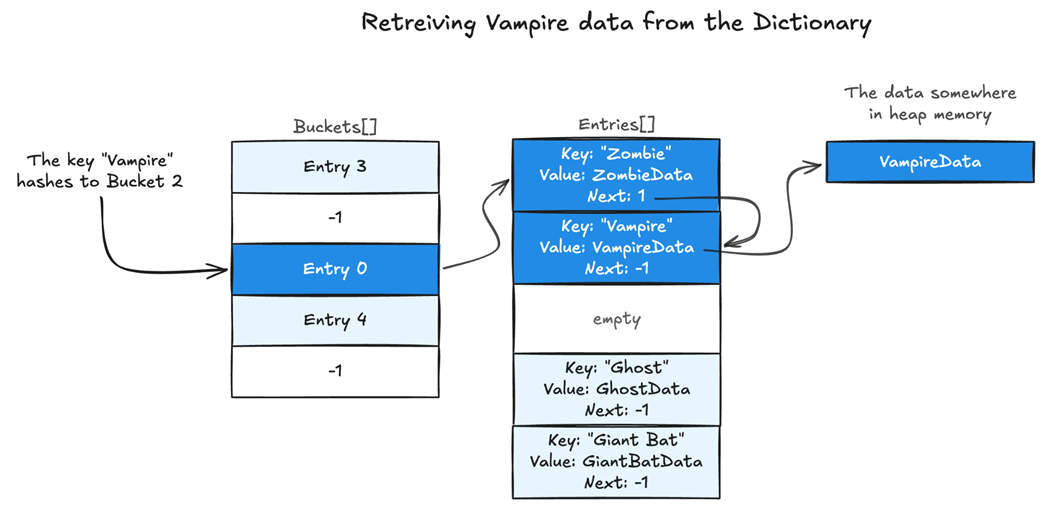
Trace a lookup whose first entry has the wrong key: the bucket leads to an entry chain, and the matching value may itself point to a separate object. section 10.1
Choose the lookup structure according to when the work happens:
- For repeated gameplay access, assign enemy-type indices at tooltime and keep balance data in arrays. Store the index in game data so the update loop can retrieve values directly. section 10.7 section 10.8
- For infrequent loading work, a dictionary can still be appropriate. Allocate it with the expected capacity when loading balance data to avoid growth, then use it when loading a saved game. section 10.6.1 section 10.7
Keep saved enemy types meaningful
Array indices can change when balance data changes. Save each enemy type’s unique identifier alongside the game data. An index-to-identifier array records what an old index meant; a preallocated identifier-to-index dictionary finds its current index when the game loads. Update saved enemy-type indices where they differ. The dictionary does this compatibility work at load time, not in the gameplay loop. section 10.6.1 section 10.8