Memory lets an AI application retain conversation history so later interactions use ongoing context instead of treating every prompt as isolated. In LangChain.js workflows, it supports context-aware responses and can feed history into larger chains. section 6.0 section 6.6
A conversation-memory flow typically follows these steps:
- Retrieve earlier messages from a database or another storage solution. section 6.3
- Associate messages with a unique session identifier so users can maintain separate conversation histories. section 6.3
- Convert retrieved messages into ChatMessageHistory instances and use them to configure a memory component. section 6.3
- Pass the memory and language model to a ConversationChain, then invoke the chain with new queries. section 6.3
- Store completed responses through an application callback when using generateText or streamText; the storage integration remains application-managed. section 6.3
Follow-up questions with conversation memory
Initialize ChatMessageHistory with system and human messages, place it in a memory instance, and invoke the chain first with an AI question and then with “What did I just ask you?” The second query uses the retained context. section 6.3
Figure 6.6 Managing user messages to improve conversation accuracy. Messages are retrieved from a database, stored with a unique session ID, and converted into a ChatMessageHistory format. This history is used to create a ConversationChain that handles user queries, using stored context to enhance response accuracy. The history is integrated into other prompts to refine the model’s performance.
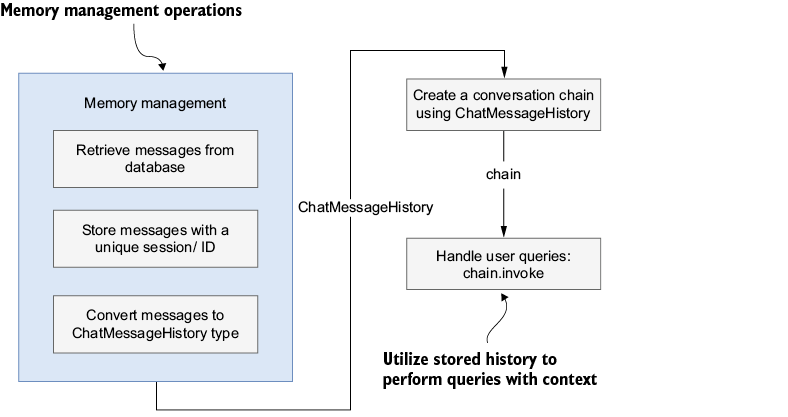
Trace the flow from session-based message retrieval through ChatMessageHistory and ConversationChain to context-enhanced responses. section 6.3













