A repository is a collection of version-controlled files, commonly hosted remotely and copied locally for development. Contributors modify files locally, then push tracked changes so others can retrieve them. section 2.1
A practical Git repository workflow uses these commands:
- Use git clone to download and track an existing remote repository. section 2.2.1
- Use git init to initialize a new local repository. section 2.6
- Use git add and git commit to stage changes and create milestones. section 2.6
- Use git push to send local changes to a remote repository, and git pull to download and merge updates. section 2.6
- Use branches and git merge to develop and combine alternate repository snapshots. section 2.10 section 2.6
Clone a shared Python repository
Run git clone https://github.com/kennethreitz-archive/requests3.git to download a repository into a local folder. Changes made there are monitored by Git; git status can reveal a newly created untracked file such as test_file.txt. section 2.2.1
Figure 2.2 Source control enables easier coding collaboration between different developers of the same codebase, often stored on a shared remote repository
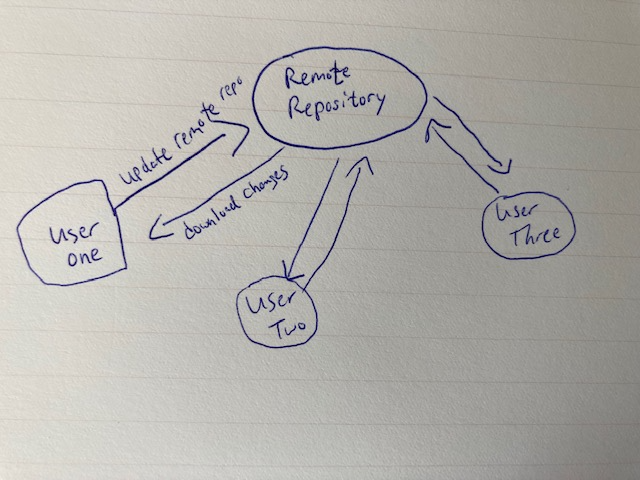
Source control connects local development with a shared remote repository, making collaboration, change tracking, reversal, conflict handling, and backup easier. section 2.1