When application state changes, the view produces a new virtual DOM tree. Reconciliation compares it with the tree used for the current view, then updates the browser’s DOM. Rebuilding the whole DOM would work, but it can replace nodes that did not need to change. The goal is a reasonably small set of operations, not a promise of the absolute minimum. section 7.0 section 7.2
There are two jobs: diffing finds changes between the trees; patching applies them to the real DOM. On the first render, mount the view. On later state changes, call patchDOM(oldVdom, newVdom, parentEl) and save the resulting virtual DOM for the next comparison. section 7.7 section 7.3
Build the comparison from three smaller helpers:
- objectsDiff(oldObj, newObj) reports added, removed, and updated keys. Use it for attributes and CSS styles. section 7.4 section 8.0
- arraysDiff() finds additions and removals in arrays of CSS classes. section 7.1 section 8.0
- arraysDiffSequence() plans operations that turn one child array into another. Work through the new array one position at a time, recording removals, additions, moves, and no-ops while tracking original indices. section 7.6.2 section 7.6.3
Start at the roots and continue recursively through matching nodes. If two nodes cannot be reused, replace the old DOM node and its subtree instead of comparing its descendants. Otherwise, update text through nodeValue or patch an element’s attributes, classes, styles, and event listeners. Apply the planned child operations, then continue into children that remain or have moved. Text and fragment nodes can be reused; element nodes need the same tag name. section 8.2.1 section 8.5
Figure 8.4 The reconciliation algorithm flow chart
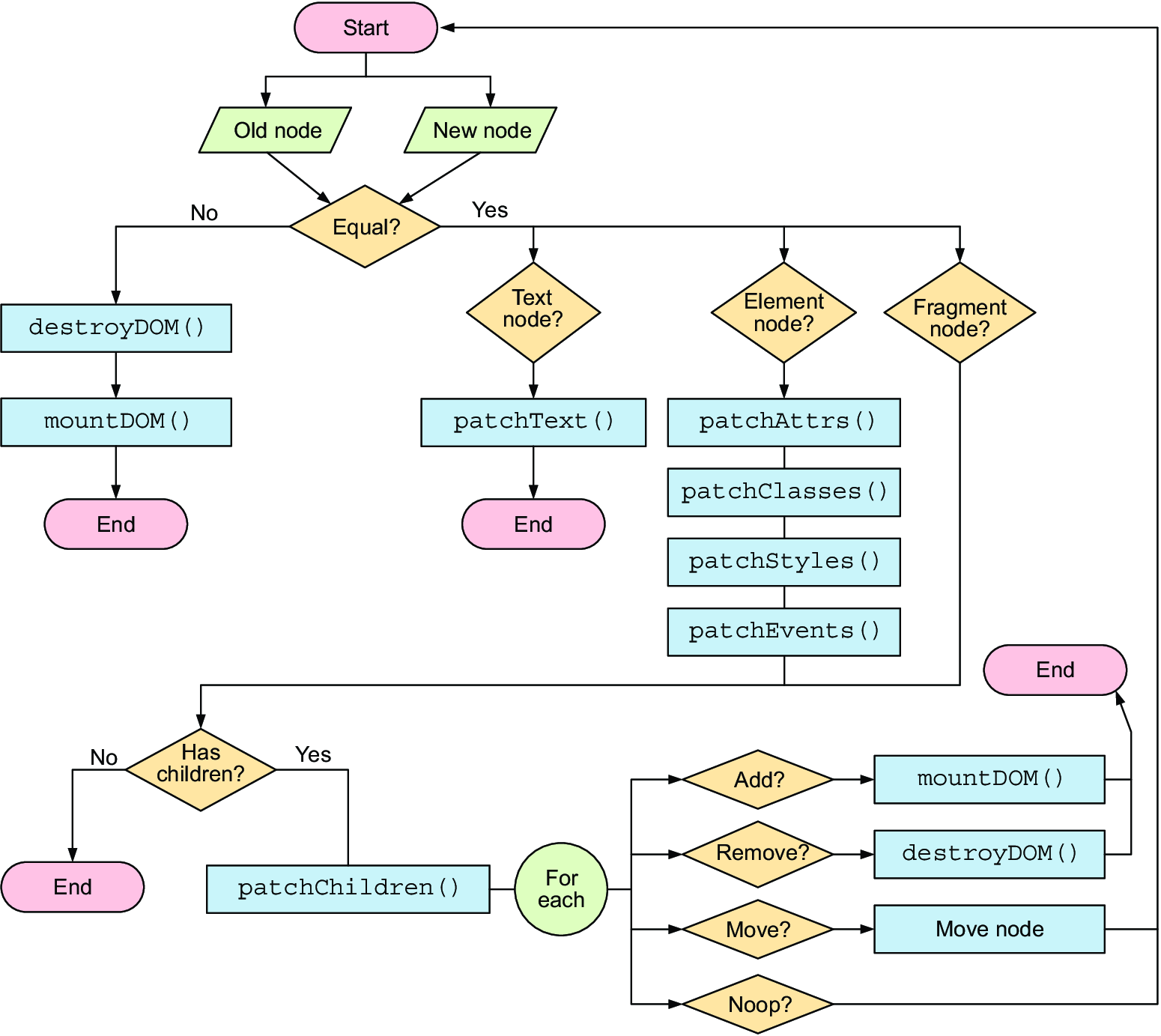
Follow the flow chart from the node comparison to either subtree replacement or property and child patching. section 8.2.1
Check that unchanged nodes stay put
In a TODOs view, type into an input while watching the DOM in browser developer tools. A rebuild highlights the whole tree. With patching, typing initially changes only the input’s value property; after three characters, removing the Add button’s disabled attribute highlights that button. Keeping the input rather than replacing it also preserves focus while typing. section 8.4.1 section 8.0
This version has a limit worth checking: elements with the same tag compare as equal even if they represent different list items. When such items swap, reconciliation may recreate unchanged descendants rather than recognize the move. Comparing keys as well as tags addresses that case. section 12.2






