Recovery point objective (RPO) is the maximum acceptable data loss after a failure. It sets how far back recovery may go: an RPO of one hour means losing more than one hour of changes is unacceptable. RPO differs from recovery time objective (RTO), which measures acceptable downtime. section 12.1 section 12.12
Mistake: assigning every database the same backup schedule. A schedule that permits one hour of loss fails an application that can tolerate only 30 minutes; an unnecessarily tight schedule consumes backup, storage, and operational resources for applications that can tolerate more loss. Establish the actual requirement with the application owner, including the cost of the protection needed. section 12.1
Use RPO to choose a recovery approach and schedule:
- Match backup frequency to the maximum loss. For a one-hour RPO, take transaction log backups hourly rather than merely after a full backup. section 12.9
- Choose the recovery model from recovery requirements. Development databases with rarely changing data may have a high RPO; a warehouse rebuilt nightly may have a 24-hour RPO. section 12.6
- Account for backup windows. ETL overlap, large differential backups, and filegroup strategies can prevent the required RPO from being met. section 12.5
- Treat “no data loss” as a high-availability and disaster-recovery requirement, then weigh the cost of redundant geographically dispersed systems against application criticality. section 12.1
The useless post-full-backup log backup
A full backup is followed immediately by a transaction log backup. After an accidental deletion, another log backup can support recovery to 9:55 a.m. But if the disk array fails at 10:00 a.m., no final log backup can be taken; restoring only the full backup loses later changes. Schedule log backups at the interval the RPO requires. section 12.9
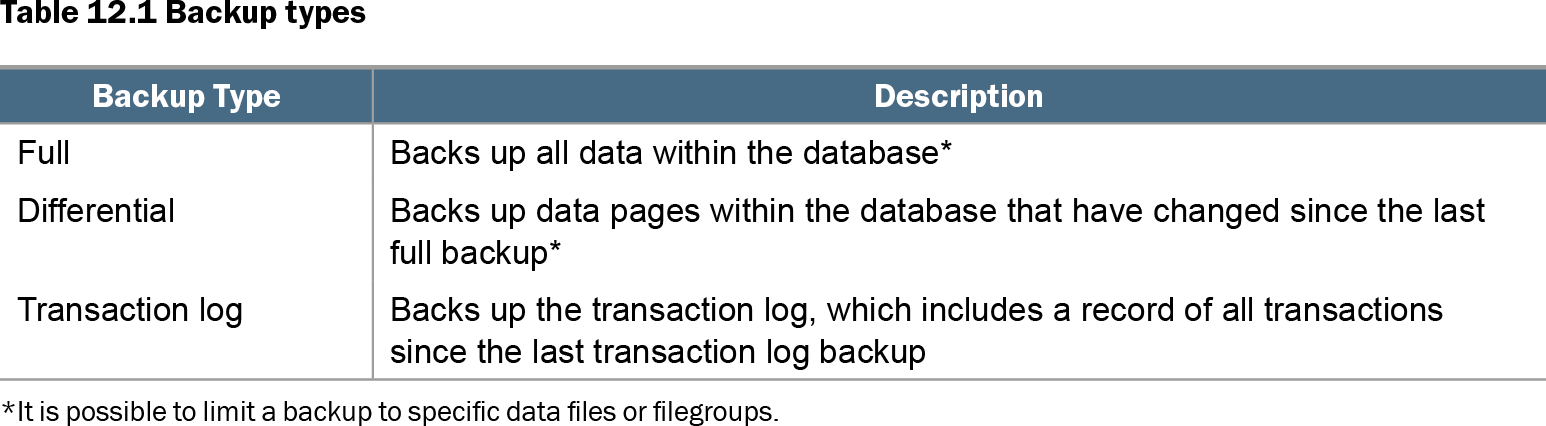
Table 12.1 Backup types (view table figure)
| Backup Type |
Description |
|---|---|
| Full |
Backs up all data within the database* |
| Differential |
Backs up data pages within the database that have changed since the last full backup* |
| Transaction log |
Backs up the transaction log, which includes a record of all transactions since the last transaction log backup |
| *It is possible to limit a backup to specific data files or filegroups. |
|
Compare full, differential, and transaction log backups when designing the backup sequence that supports the required RPO. section 12.1