An entity-relationship diagram (ERD) maps data entities such as tables, their attributes such as columns, and the relationships between them. It can show primary and foreign key constraints and optionally record each column’s data type. section 3.1 section 4.1
Use an ERD to make database design decisions visible and testable:
- Document the current table structure, expected column values, data types, primary keys, foreign keys, and relationships. section 3.1 section 4.4
- Validate normalization instead of relying on personal judgment, helping expose nonatomic values and duplicated data. section 4.1
- Use the diagram as the code-level diagram in a C4 model when documenting a database design. section 3.1 section 4.1
Employees ERD
An Employees ERD records EmployeeID and ManagerID as SMALLINT because the expected number of unique values is below the INT range. It records StaffOrContract as BIT because the column stores 0, 1, or NULL, and documents the remaining columns with their types and expected values. section 3.1
Figure 3.1 Employees ERD
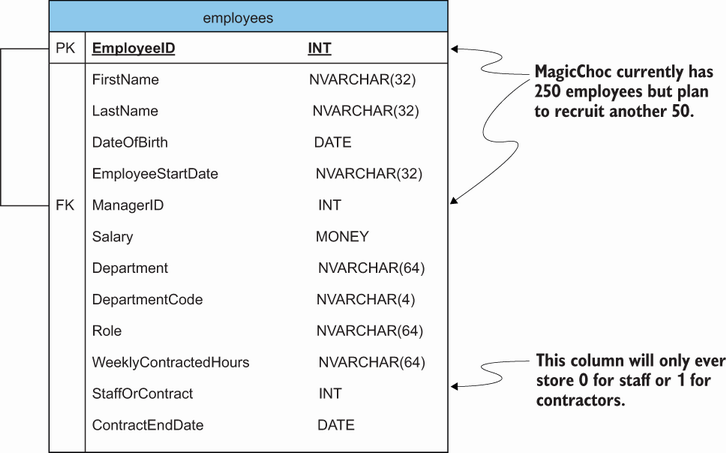
The Employees ERD figure provides a concrete visual model of entities, attributes, relationships, and annotated data types. section 3.1



