Scalability is the ability to increase or decrease capacity as demand changes. For a web shop, traffic can vary by time of day, weekday, or season. Adding virtual machines during a peak and removing them afterward avoids buying or running excess capacity all the time. Storage capacity can grow as data grows. section 1.3.4
On Amazon EC2, an Auto Scaling group manages a changing pool of virtual machines. A launch template specifies the image, instance size, and startup configuration so new machines are uniform. Set a desired capacity for the number that should run, a minimum to preserve a baseline, and a maximum to bound spending. The group adds or removes instances to match the desired capacity and replaces unhealthy ones. section 17.1
Choose how desired capacity changes:
- Use a schedule for predictable changes in demand, or use CloudWatch metrics and scaling policies to respond to measured load. section 17.1 section 17.2.2
- For web requests, put a load balancer in front of the pool so visitors keep one entry point while instances come and go. Keep shared data outside the web servers. section 17.3
- For background work, put requests in an SQS queue and scale workers using queue length. Queued requests wait through a peak rather than requiring an immediate response. section 17.3.2
Scale a WordPress blog
A WordPress setup places an Elastic Load Balancer (ELB) before EC2 web servers, stores database data in RDS and files in EFS, and uses CloudWatch CPU utilization to adjust the Auto Scaling group. Its configuration sets a minimum of two and a maximum of four servers, with a target-tracking policy aiming for 70% average CPU utilization. A CloudFormation template creates the setup, and a load test exercises scaling. section 17.3.1
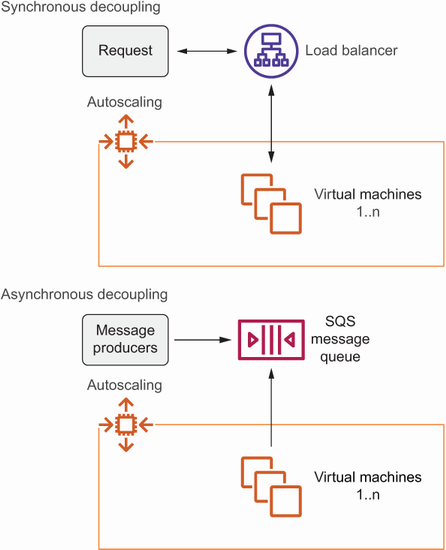
Compare the stable entry points for a changing instance pool: a load balancer for immediate requests and a queue for background work. section 17.3
Scaling and availability overlap but are not identical. An Auto Scaling group can replace a failed EC2 instance in another availability zone, provided it is configured across suitable subnets. That replacement cannot retain the original private IP address; persistent data on an EBS volume also needs separate planning. For a stable endpoint, use an Elastic IP associated during startup, DNS, or a load balancer. Storing shared data in services such as EFS, RDS, S3, or DynamoDB helps keep servers replaceable. section 13.2.2 section 13.2.4 section 13.4
Choose a scaling signal that reflects the workload. CPU-based scaling can be tricky for burstable instances because available CPU credits affect their performance; another metric or a non-burstable instance may be more suitable. Capacity choices also change costs: DynamoDB, for example, offers automatically adapting on-demand capacity or provisioned capacity with optional autoscaling, and the cheaper choice depends on usage patterns. Container workloads can instead adjust an ECS service’s desired task count with Application Auto Scaling. section 17.2.2 section 12.11 section 18.5