A scatter plot represents paired quantitative observations as points positioned on two axes. In an ACH dashboard, it compares batch item counts with total dollar amounts, helping users spot batches with unusually large values. section 6.6
A practical implementation can be built incrementally:
- Pass batch data into a typed, read-only component instead of fetching it inside the chart, avoiding repeated API calls when several components use the same data. section 6.7.1
- Derive a total amount for each company batch by adding credit and debit amounts, then plot recordCount on the X axis and totalCreditAndDebits on the Y axis. section 6.7.1
- Enhance interpretation with a legend, grid, custom currency ticks, custom tooltip content, and colors that distinguish companies. section 6.7.4
ACH batch risk view
Each point represents a company batch. Points farther along the horizontal axis contain more items; points higher on the vertical axis have larger combined credit and debit amounts. Grouping points by company makes large batches easier to inspect and creates a starting point for detecting unusual activity when historical data becomes available. section 6.6 section 6.7.1
Figure 6.5 An ACH batch view
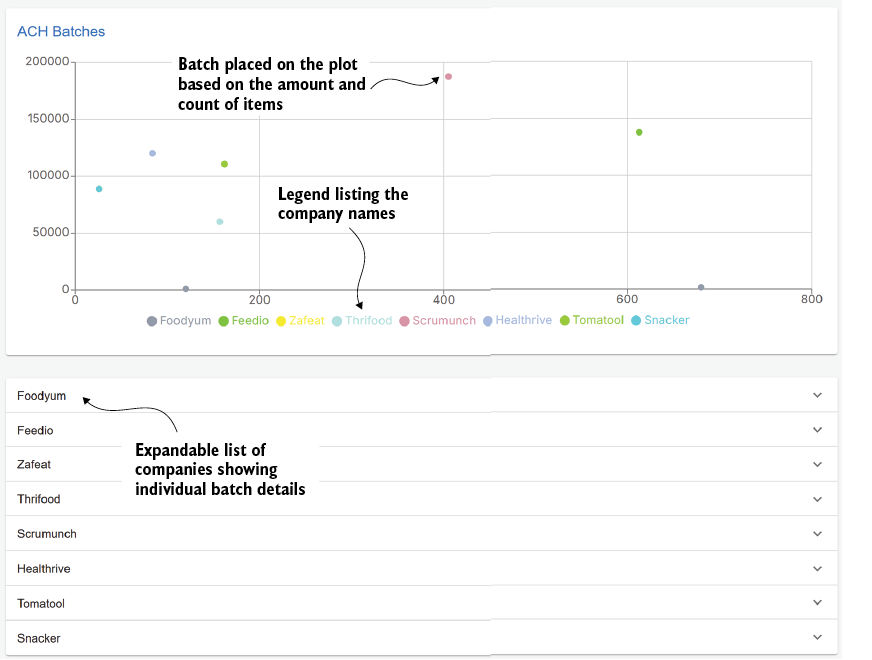
Use the ACH batch view to see how the scatter plot fits into a dashboard that opens batch details from a selected file. section 6.6







