SQLite is a lightweight relational database engine suited to prototyping machine-learning pipelines. It stores prediction outputs in a database that can be queried outside the Python session. section 9.2.1
A practical churn-prediction workflow uses SQLite to:
- Create or open a local customers database with sqlite3. section 9.2.1
- Create a customer_churn_predictions table with customer ID, model prediction, and prediction date columns. section 9.2.1
- Upload model predictions from a pandas DataFrame, then retrieve them with sqlite3, pandas, or SQL. section 9.2.1
Querying stored predictions
After connecting with sqlite3.connect("data/customers.db"), execute SELECT * FROM customer_churn_predictions and fetch the returned records. Alternatively, use pandas.read_sql(...) to load the query result into a DataFrame. section 9.2.1
Figure 9.2 This diagram extends Figure 9.1 to also show the sample output table, which can be stored in an RDMS, like MySQL, SQL Server, SQLite, etc. The view shows a sample record of the data, with values for customer_id, model_prediction, and date (prediction date).
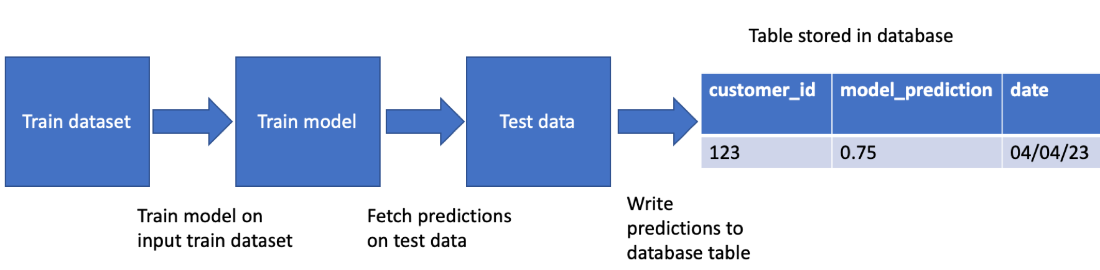
View how a machine-learning workflow writes customer_id, model_prediction, and prediction_date into a relational database output table. section 9.2.1