Image style is the set of visual characteristics and conventions that shape an image’s appearance and expressive feeling. In diffusion generation, it can turn the same subject from a realistic scene into a surrealist painting, wood etching, anime image, or medieval manuscript. Style is not decoration added after the fact: it changes what the image feels like. section 1.3.3 section 1.4
Use style as a practical control while generating:
- Add a clear style phrase to the prompt, then compare several outputs rather than trusting the first result. section 1.3.3 section 1.4
- Treat style and subject as separate checks: an image can depict the right object while missing the intended visual tradition. section 9.2.2
- If prompting alone is not enough, use a style-focused LoRA in a ComfyUI workflow to alter the model’s visual output. section 11.4.1
- Compare models before assuming the newest one wins; older Stable Diffusion variants may follow demanding styles more faithfully than Flux. section 9.2.2
One coffee cup, several visual identities
Start with “a cup of black coffee, on a diner counter.” Add “surrealist painting” for an uncanny, dreamlike result or “wood etching” for a rustic illustrated appearance. For a harder test, prompt “medieval illuminated manuscript showing a cup of coffee”: SDXL and SD1.5 capture that historical style more convincingly than Flux, even though Flux produces a recognizable cup. section 1.3.3 section 9.2.2
Figure 9.12 The image in SD1.5 looks a little “melted” but the style is spot on.
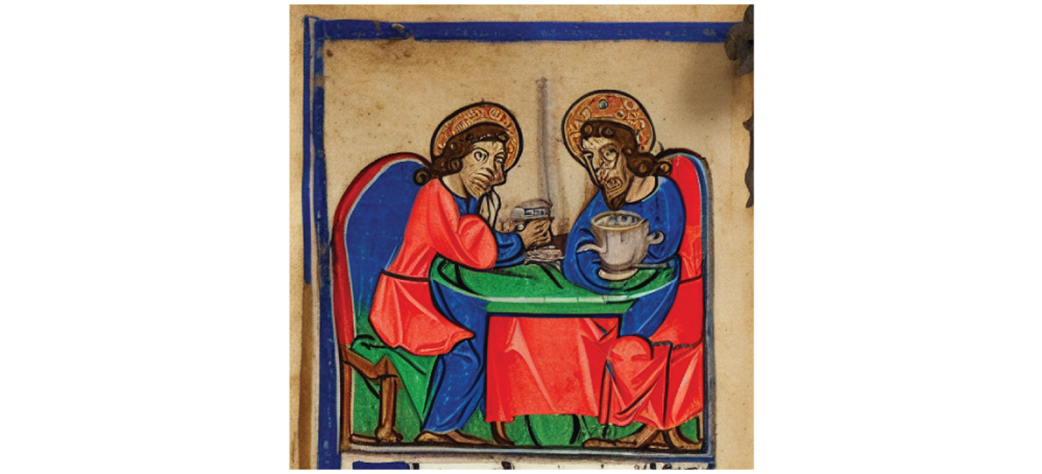
Compare the medieval-manuscript coffee results across SD1.5, SDXL, and Flux to separate subject accuracy from style accuracy. section 9.2.2
Figure 11.6 Using the Amateur Photography LoRA dramatically changes the style of our image.
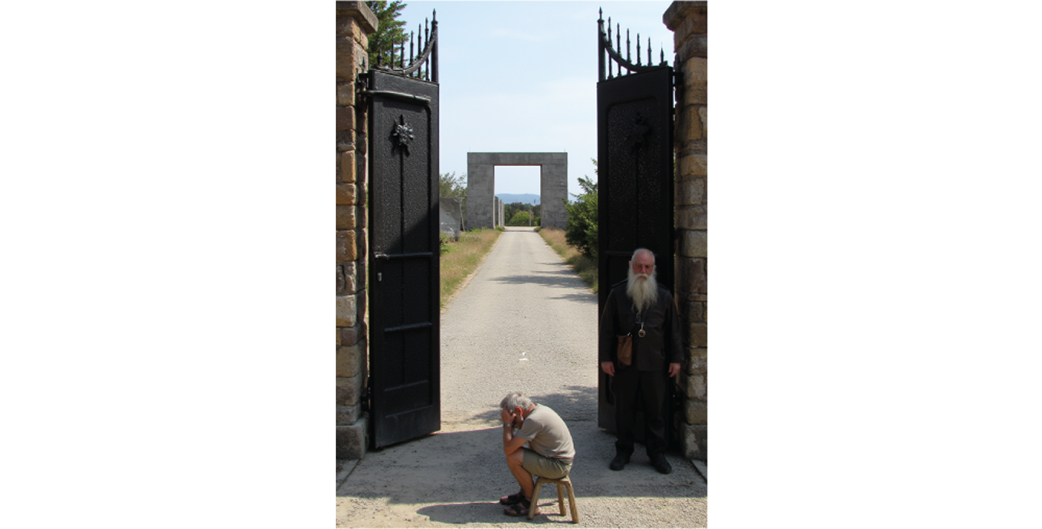
Inspect how an Amateur Photography LoRA changes an otherwise polished Flux image into a more specific photographic style. section 11.4.1