A subnetwork, or subnet, is a subdivision of a network with its own IP address range. In AWS, subnets divide a Virtual Private Cloud (VPC) so resources with different access needs can be placed separately. Route tables and network access control lists (NACLs) help control traffic. section 5.5
For an internet-facing web application, start with two roles:
- Use a public subnet for a component that needs an internet route, such as a proxy or load balancer. section 5.5
- Use a private subnet for backend servers or databases that should not be reached directly from the internet. A private subnet has no internet route. section 5.5
Place a proxy and backend
In a VPC with address space 10.0.0.0/16, assign 10.0.1.0/24 to the public proxy subnet and 10.0.2.0/24 to the private backend subnet. In CloudFormation, an EC2 instance’s SubnetId selects its subnet; the backend configuration uses `SubnetId: !Ref SubnetPrivateBackend`. Clients reach the backend through the proxy, not directly from the internet. section 5.5 section 5.5.4
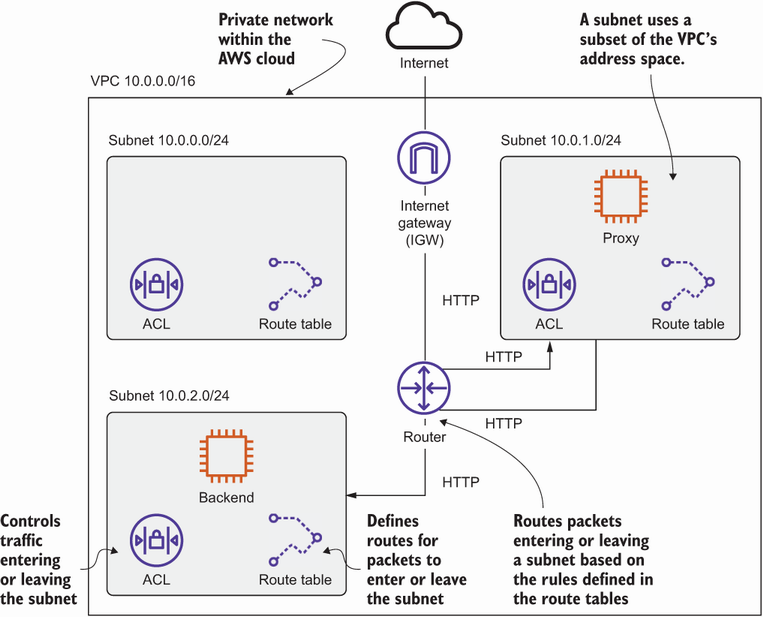
The VPC diagram shows how public and private subnets separate the web application’s entry point from its backend. section 5.5
Plan for two limits. Without internet access, a backend instance cannot install Apache from a public Yum repository; a NAT gateway can provide internet access from a private subnet. Also, each subnet is linked to one Availability Zone. A replacement instance launched in another zone needs another subnet and cannot retain the same private IP address. Use subnets in multiple zones when avoiding dependence on one zone matters. section 5.5.4 section 5.6 section 13.2.4 section 16.0




