A text-to-image model generates an image that matches a written prompt. DALL-E 2, Imagen, and Stable Diffusion are examples. The prompt is a conditioning signal: it guides image generation rather than merely naming an image after it is made. section 1.3.3 section 15.5
The useful baseline is an unconditioned diffusion model. To learn how one generates flower images, add noise to training images until they resemble random noise, then train a denoiser to reverse that process. At generation time, the denoiser starts with noise and repeatedly refines it into an image. A text-to-image model follows a similar reverse-diffusion process, but uses a text embedding to guide each step toward the prompt. section 15.0 section 15.4.2
DALL-E 2 illustrates the connection between words and pictures. A text encoder turns the prompt into an embedding. CLIP uses text and image encoders trained to bring matching pairs closer in a shared embedding space and separate nonmatching pairs. In the described generation path, a prior derived from the text embedding joins it as a conditioning vector; a U-Net denoiser then repeatedly processes noisy images with that vector until it produces a clean image. section 15.5.1
Figure 15.9 How text-to-image Transformers such as DALL-E 2 create images based on text prompts. The text encoder in the trained text-to-image Transformer first converts the text description in the prompt into text embedding. The text embedding is fed to the CLIP model to obtain a prior vector that represents the image in the latent space. The text embedding and the prior are concatenated into a conditioning vector. To generate an image, the U-Net denoiser first takes a random noise vector as input to generate a noisy image using the conditioning vector. It then takes the noisy image and the conditioning vector as input and generates another image, which is less noisy. The process is repeated for many iterations until the final output, a clean image, is generated.
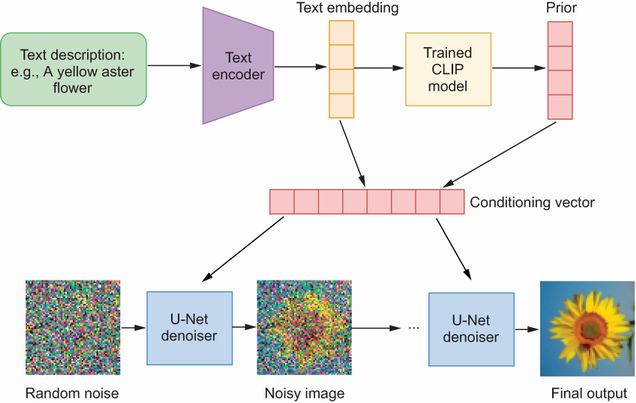
Follow the prompt from text embedding to conditioning vector, then through repeated U-Net denoising. section 15.5.1
Generate an image with DALL-E 2
With an OpenAI API key, create an OpenAI client and call client.images.generate with model="dall-e-2", a prompt such as “an astronaut in a space suit riding a unicorn,” size="512x512", quality="standard", and n=1. Read response.data[0].url to view the result. The URL expires in an hour, and another run may produce a different image. Try replacing the prompt with “a cat in a suit working on a computer.” section 15.5.2





