A tool gives a GenAI application a way to do something beyond producing text. It is an external computer function that accepts parameters, performs a specific operation, and returns a result. A tool might call an API, query a database, search for live information, send a message, or trigger a device. In this sense, an LLM can reason about a request, while tools provide access to data and actions outside the model. section 5.2 section 1.4
Tools are normally used through an agent. The agent wraps an LLM, supplies the available tool descriptions and current task state, and lets the LLM decide whether to answer directly or request a tool call. After a tool returns a result, the agent can reason again, choose another action, or finish the response. This loop supports tasks whose next step depends on what earlier calls discover. section 5.2 section 5.1
A usable tool needs a clear interface for the agent:
- A name that identifies the capability. section 5.2
- A short description of what it does and when it is useful. section 5.2
- The parameters it expects, so the agent can form a valid call such as do_this(parameter_a, parameter_b). section 5.2
- A result that can be returned to the agent for the next reasoning step. section 5.2
Figure 5.1 The looped life of an agent: at each iteration, it decides whether to use a tool or to respond to the user.
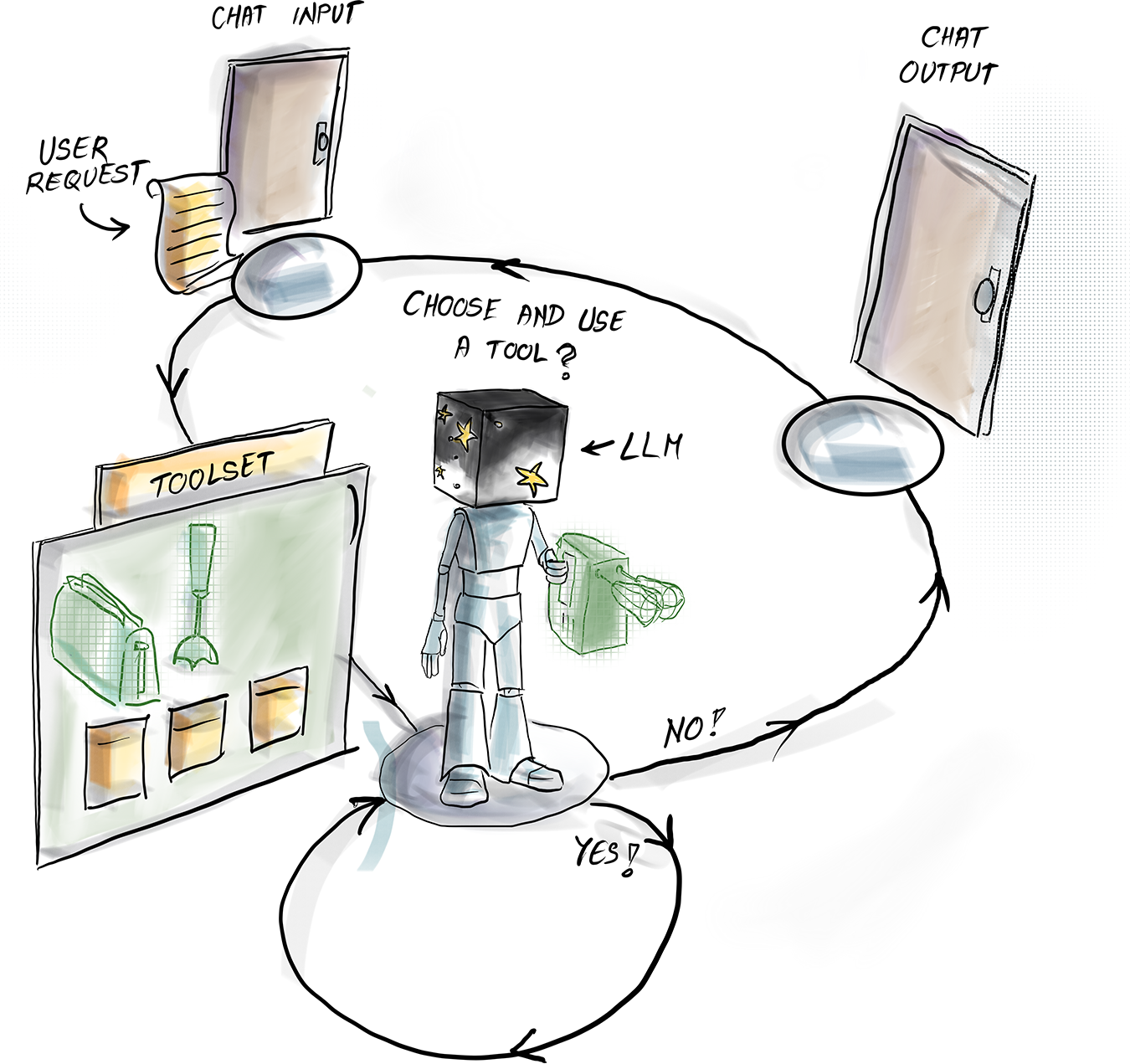
The agent loop shows the central decision: use an available tool when needed, then continue from its result, or respond directly when no call is necessary. section 5.2
A calculator as a tool
Language models can produce plausible-looking answers to difficult arithmetic without actually calculating precisely. A calculator tool separates the jobs: the agent interprets the request, sends the arithmetic expression to the calculator, receives the computed result, and turns it into a user-facing answer. Limiting the agent to this one tool also makes its available capabilities easy to understand. section 5.3
Tools act as bridges from LLM reasoning to external systems. They can connect an agent to calendars and email, patient records and sensors, advertising dashboards, customer records, local files, cloud services, or databases. The value is not merely access: an agent can fetch current information, trigger an action, and combine results across several steps when a fixed question-and-answer exchange is insufficient. section 5.5 section 5.7
In Langflow, a component can become a tool by activating Tool Mode. This applies to simple components such as a calculator and to web search, URL fetching, Wikipedia queries, or even an entire reusable flow. The visual approach supports quick experimentation, while the underlying idea remains independent of a particular model or framework. section 5.7 section 1.1













