A tool is a callable function that lets a language model do work outside its own response. Its interface is described in natural language so an agent can choose it, supply inputs, and use the returned result to decide what to do next. A tool might run a database query, search the web, or perform a calculation. section 1.6 section 10.3
Consider the question, “What was the most sold game in 2016, and how is it played?” Sales figures are in a SQLite database, while an explanation of gameplay may require a web search. An agent can inspect the database, query the sales figures, and then use another tool for the information the database lacks. The point is not to prescribe every step in advance: the agent can choose its next call from the results it receives. section 1.6 section 10.4.4
A tool call has three practical parts:
- A description tells the agent what the tool does and how to use it. Clear function and parameter names help make a custom tool understandable. section 1.6 section 10.5.1
- Inputs specify the work. For example, a database-schema tool takes a table name; a currency converter takes a US-dollar amount and a target currency. section 10.4.4 section 10.5.1
- The returned result becomes information the agent can use for another call or its final answer. In a database trace, listing tables leads to inspecting a table and checking a proposed query. section 1.6 section 10.4.4
Figure 10.2 Using language models as agents. Given a prompt describing the task and available tools, the language model decides on termination and tool invocations. Results of tool invocations are added to the prompt used for the next iteration.
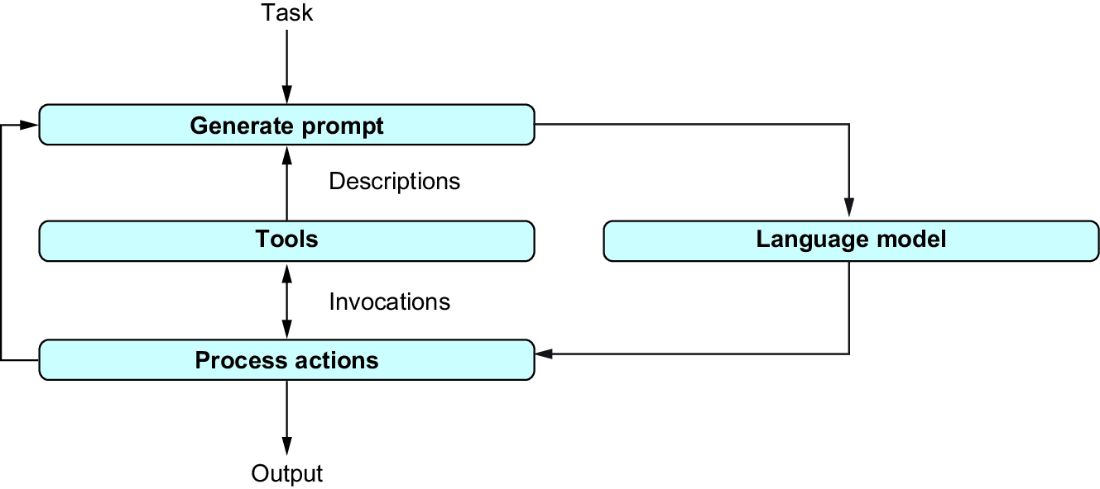
The agent loop shows where tool descriptions, invocation results, and the decision to continue or finish fit together. section 10.3
For a LangChain agent, standard tools can be loaded by name. A SQL agent can receive database tools generated from a database object plus a web-search tool loaded through SerpAPI. Specialized work can instead be exposed as a custom Python function: place LangChain’s @tool decorator immediately before it, give it a meaningful name and docstring, and specify parameter and return types. The currency-converter example accepts an amount and currency and returns either a converted value or an unsupported-currency message. section 10.4.2 section 10.5.1
Listing 10.3 Data-analysis agent with currency-converter tool
import argparse

from langchain.agents.load_tools import load_tools
from langchain.tools import tool
from langchain_community.utilities.sql_database import SQLDatabase
from langchain_community.agent_toolkits.sql.base import create_sql_agent
from langchain_openai import ChatOpenAI
from typing import Union

@tool  #1
 #2
def convert_currency(USD_amount: float, currency: str)->Union[float, str]:
     #3
    """ Converts an amount in US dollars to another currency.

    Args:
        USD_amount: amount in US dollars.
        currency: name of target currency (e.g., "Yen").

    Returns:
        input amount in target currency.
    """
    conversion_factors = {
        'Euro':0.93, 'Yen':151.28, 'Yun':0.14,
        'Pound':1.26, 'Won':0.00074, 'Rupee':0.012}

    if currency not in conversion_factors:
         #4
        error_message = (
            f'Unknown currency: {currency}!'
            f'Use one of {conversion_factors.keys()}')
        return error_message

     #5
    conversion_factor = conversion_factors[currency]
    converted_amount = USD_amount * conversion_factor
    return converted_amount

if __name__ == '__main__':

    parser = argparse.ArgumentParser()
    parser.add_argument('serpaikey', type=str, help='SERP API access key')
    parser.add_argument('dbpath', type=str, help='Path to SQLite database')
    parser.add_argument('question', type=str, help='A question to answer')
    args = parser.parse_args()

    llm = ChatOpenAI(
        temperature=0, model='gpt-4o')
    db = SQLDatabase.from_uri(f'sqlite:///{args.dbpath}')
    extra_tools = load_tools(
        ['serpapi'], serpapi_api_key=args.serpaikey, llm=llm)
     #6
    extra_tools.append(convert_currency)

    agent = create_sql_agent(
        llm=llm, db=db, verbose=True,
        agent_type='openai-tools',
        extra_tools=extra_tools)
    agent.invoke({'input':args.question})
The listing provides a concrete custom-tool function and shows its decorator, typed inputs, and docstring. section 10.5.1
External tools are especially useful when structured data is too large to put in a model prompt: the model can formulate a query and a specialized tool can process it. Still, do not treat generated commands as automatically correct. They may be wrong or may change or delete data; keep backups before enabling model-driven data access. section 5.1













