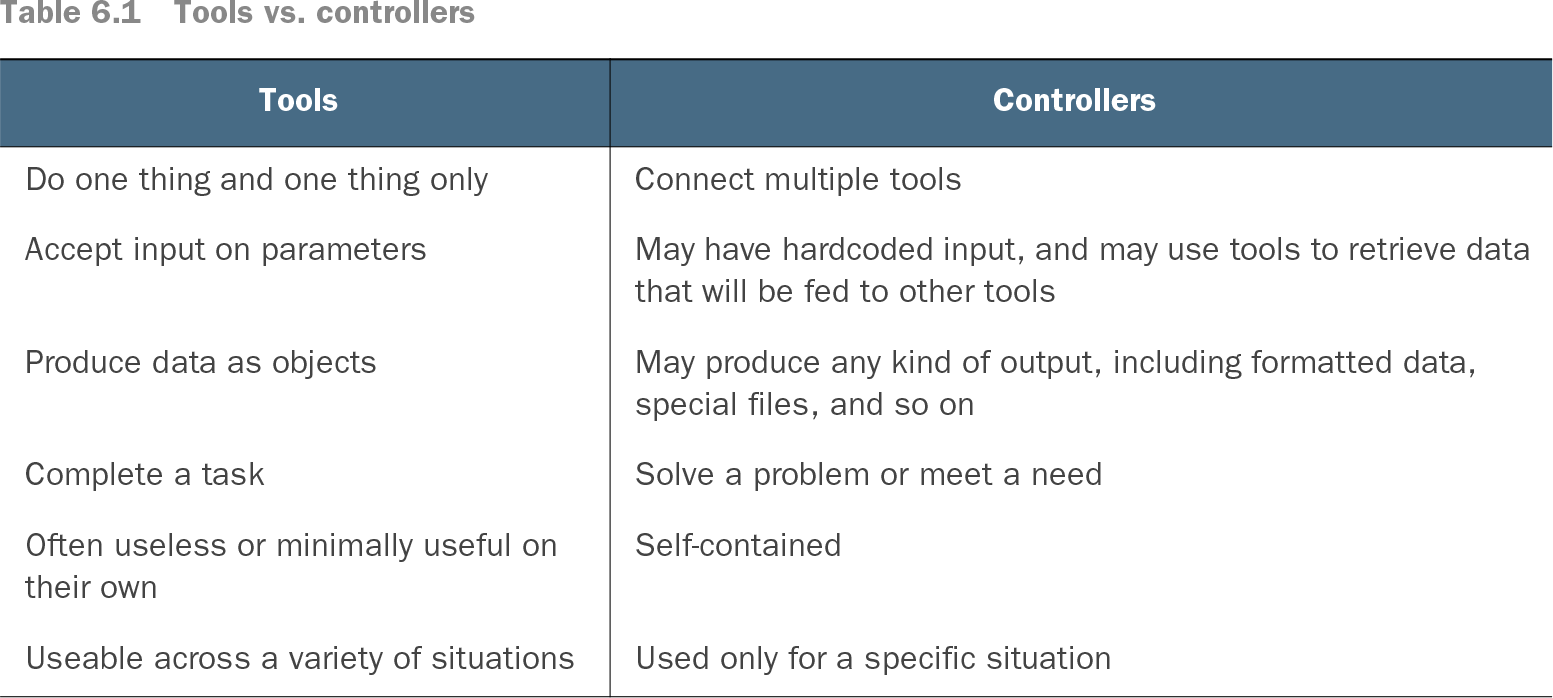
A tool is a reusable, self-contained unit that performs one focused task. In PowerShell, commands—including cmdlets, functions, and other executable artifacts—work best when they accept input through parameters and produce useful output without knowing the surrounding situation. section 6.1 section 1.1
Design a tool around these practical boundaries:
- Give it one responsibility. Five small tools are usually easier to write, test, debug, and maintain than one tool with five unrelated jobs. section 6.2 section 8.2
- Accept input through parameters rather than assuming where data originates. This lets another command, file, or object provide the input. section 6.2 section 8.3
- Return data as objects and leave presentation to other tools. Formatting, exporting, and management-specific displays belong outside the core task. section 6.4 section 24.0
- Follow native PowerShell patterns: use an approved verb-noun name, familiar parameter names, and an organizational noun prefix where appropriate. section 8.4
- Keep the tool independent from orchestration. A controller supplies context, connects several tools, and turns separate actions into a business process. section 6.1 section 6.4
Password-expiration reminders
Break the workflow into distinct tools: get enabled accounts with expiring passwords, calculate expiration dates, filter by the notification window, send messages, and export an audit trail. A controller can connect them: Get-EnabledExpiringUser | Add-ExpiryDataToUser | Where-Object { $_.DaysToExpire -lt 2 } | Send-PasswordExpiryMessageToUser | Export-CSV report.csv. Each tool can also be reused in another process. section 6.5.1
Reusable service automation
A service-changing tool can accept one or more computer names, change a service logon account, and output each computer, service, account, and success or failure. Separate functions and a script module make the functionality reusable; object output can later feed a screen, HTML report, or CSV. section 8.6.1 section 10.6
Table 6.1 Tools vs. controllers (view table figure)
| May have hardcoded input, and may use tools to retrieve data that will be fed to other tools |
|
| May produce any kind of output, including formatted data, special files, and so on |
|
Compare tools with controllers by responsibility, input handling, output form, usefulness, and situational scope. section 6.4