A tool is a callable capability outside a language model that lets an AI agent obtain information or act on an external system. Tools bridge the gap between reasoning over existing context and accessing live data, user-specific systems, files, or services. section 4.1
In the agent loop, the model reasons over the current context, selects a tool and arguments when needed, and incorporates the execution result before continuing or responding. The agent harness or application supplies the tool definitions; calls and outputs add further information to the context window. section 4.1
Figure 4.1 Tools as an additional context source for AI agents: the context window holds the tool definitions available to the agent, and it grows with every tool call the model emits and every tool output returned by execution
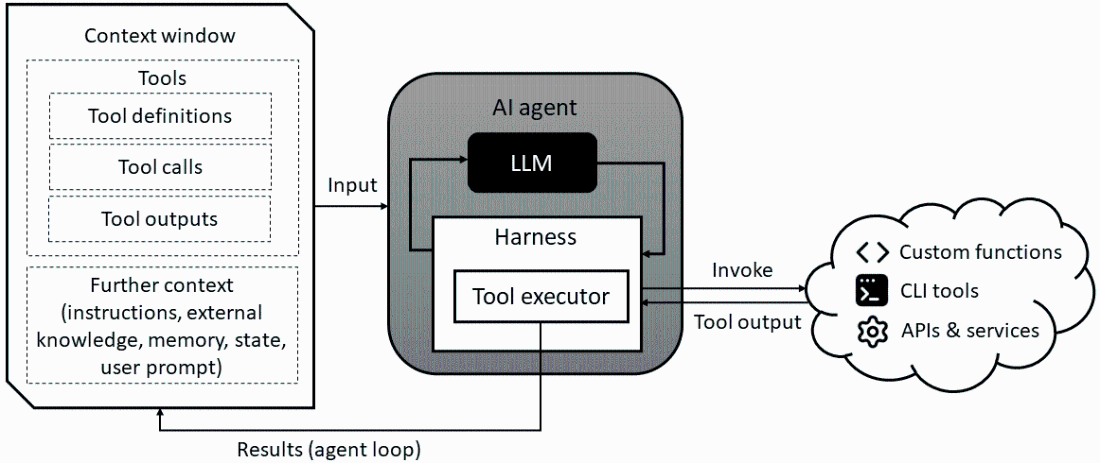
Shows how definitions, calls, and execution outputs accumulate in the agent’s context window. section 4.1
Three paradigms provide access to tools:
- Function calling uses schemas to invoke predefined capabilities, such as API requests, database queries, or code execution. section 4.7
- The command-line interface (CLI) lets an agent interact with the host environment through shell commands and utilities. section 4.7
- The Model Context Protocol (MCP) provides client-server access to discoverable tools, resources, and prompts. section 4.7
An MCP tool definition includes a name, a natural-language description, a parameter schema, and an output schema. The description helps the model select the tool; the schemas specify its inputs and returned data. In multi-server deployments, qualified names can also route calls and reduce naming collisions. section 4.5.2
Filesystem tools
A filesystem MCP server can expose list_directory(path), read_file(filename), and write_file(filename, content). For a request to save text to a file, an agent can select write_file, supply the filename and content, and use the server’s execution result as an observation. section 4.5.2
Because tools can affect external systems, constrain and observe their use with controls such as least-privilege permissions, argument validation, sandboxing, approval gates, and invocation tracing. section 4.7