A Quartz.NET trigger is a scheduling definition that tells a job when to execute and how often to repeat. A single job can have multiple triggers, while the scheduler tracks them and runs the job. section 34.3
Configure a trigger to control:
- Start and end times. section 34.3.2
- Repeat counts and intervals, such as every five minutes. section 34.3.2
- Calendar windows, such as Fridays at 5:30 p.m. or weekdays from 9 a.m. to 5 p.m. section 34.3.2
- Handling missed executions when the application was not running. section 34.3.2
Update exchange rates every five minutes
Register an UpdateExchangeRatesJob with a unique JobKey, associate a trigger with that key, start it immediately, and apply a five-minute interval. For a weekly schedule, replace the simple schedule with a weekly calendar that fires on Friday at 5:30 p.m.
Figure 34.5 Using clustering with Quartz.NET allows horizontal scaling. Quartz.NET uses a database as a backing store, ensuring that only a single instance of the application handles a trigger at a time. This makes it possible to run multiple instances of your application to meet scalability requirements.
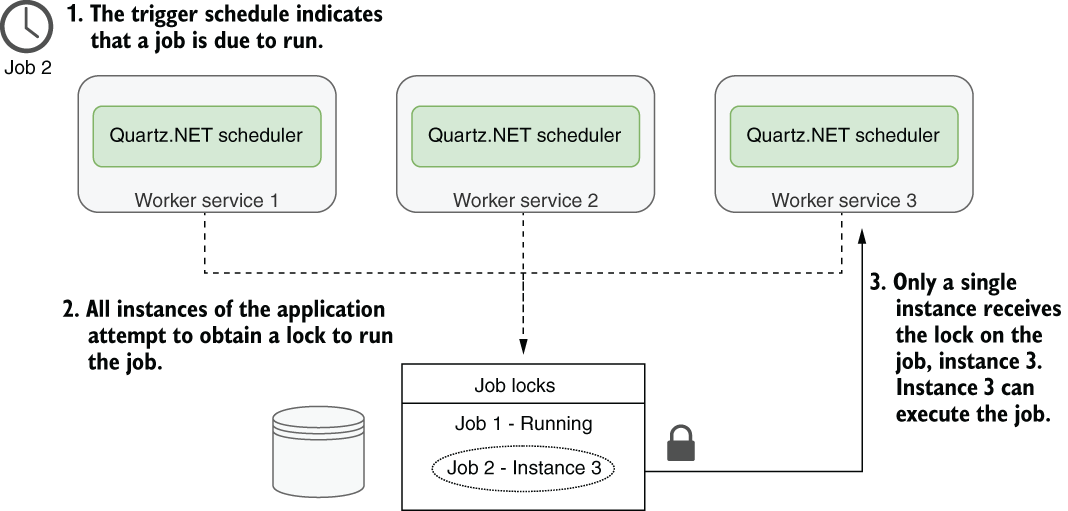
Use the clustering figure to see how database locking lets multiple application instances coordinate so only one handles a trigger. section 34.3.3








