A trigger runs server-side logic when a configured event occurs. In MongoDB Atlas Application Services, it invokes an Atlas Function without a separate application server. Use triggers when data changes or recurring tasks should start work automatically—for example, synchronizing records, sending notifications, or enforcing business rules. section 19.2 section 19.3
Choose the trigger type to match the event:
- Database: respond to document inserts, updates, deletes, or replacements in a collection. section 19.2.1
- Scheduled: run a function at predefined intervals, such as for a daily report; advanced scheduling supports cron expressions. section 19.3 section 19.2.1
- Authentication: respond to user events such as registration, login, or account deletion. section 19.3
Each trigger is connected to a function. When its criteria match, the trigger passes an event object to that function. Database triggers use MongoDB change streams to detect collection changes; the associated JavaScript function supplies the response, including work that calls an external API. section 19.3 section 19.2.1
React to a new document
On insertion, a database trigger can invoke a function that calls the OpenAI Embedding API, then stores the resulting vector alongside the original document. For a simpler first check, log the received change event and verify that it contains an operationType before acting. section 19.2.1
Figure 19.5 The Add Trigger interface in Atlas. At the top, you can choose the trigger type: Database or Scheduled. In the Trigger Details section, you can set the trigger’s name, enable or disable it, choose to skip events when reenabled, and control event ordering. (Image © MongoDB 2025)
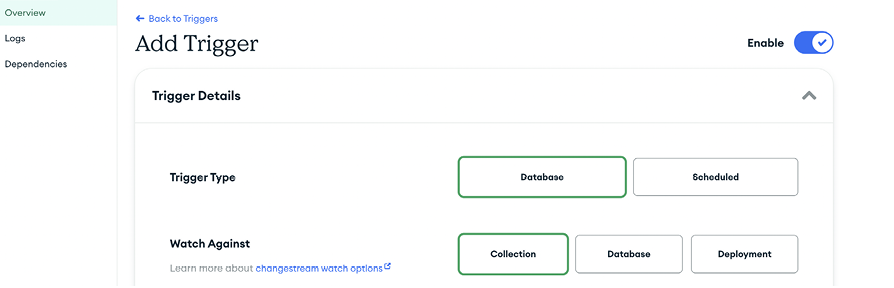
The Add Trigger interface shows where to choose a type, name and enable the trigger, and set event-ordering or reenablement behavior. section 19.2.1
Figure 19.6 The interface for setting up a scheduled trigger. Trigger Type is set to Scheduled, indicating that this trigger will execute at regular intervals. Schedule Type is set to Advanced, which allows complex scheduling with cron expressions. cron expressions provide flexibility by allowing you to define when the trigger should run. (Image © MongoDB 2025)
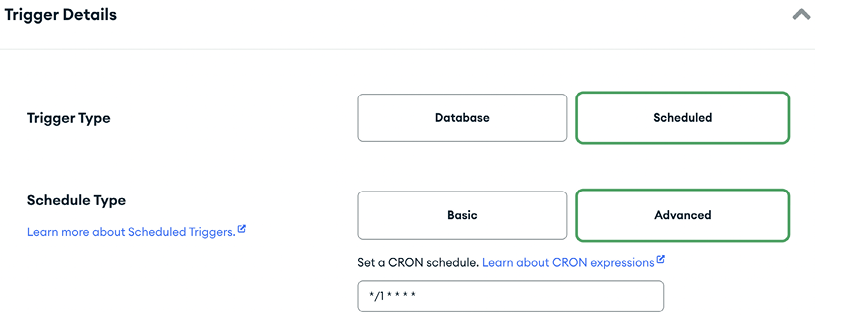
The scheduled-trigger interface shows the Advanced schedule option for defining execution times with a cron expression. section 19.2.1








