A font is a particular working version of a typeface: the underlying letterform design plus chosen attributes such as weight, size, and italics. In everyday conversation, “font” and “typeface” are often used interchangeably, but the distinction is useful when comparing styles within one family. Roboto, for example, is a typeface; its bold, italic, or differently sized variants are fonts. section 5.1.2
Figure 5.1 Demonstrating what the same phrase looks like in the Roboto typeface, but in various fonts (all the same size)
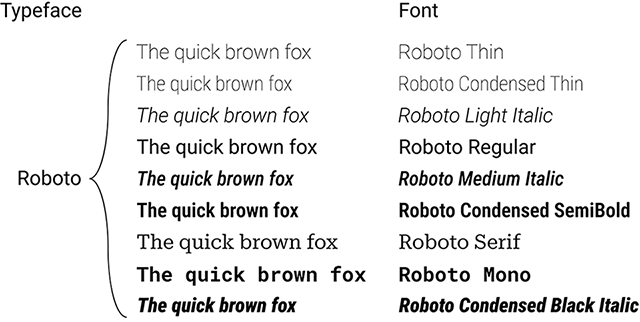
Compare one phrase across variants of Roboto to see how a single typeface yields visibly different fonts without changing the basic design. section 5.1.2
Fonts do more than carry words. In data visualizations, most type is small: axis labels, data labels, annotations, and captions. At those sizes, a font’s weight and its balance of ink and white space strongly affect whether people can read it comfortably. Very thin text can fade away; very heavy text can feel crowded. Regular weight is usually the safer default, reserving heavier weight for needed emphasis. section 5.2.1
When selecting a font for readable visualizations, check the details that matter at small sizes:
- Prefer generous internal and surrounding white space, including a large apparent x-height and rounded counters, to support legibility. section 5.2.1 section 5.6
- Make easily confused characters visibly distinct, especially lowercase l, numeral 1, and uppercase I. section 5.2.1 section 5.6
- Use lining and tabular numerals in dense tables: shared height and equal numeral widths make columns align and values easier to scan. section 5.2.2
- Start with one font and minimal styling; add a contrasting title style only when it creates useful hierarchy rather than noise. section 5.2.3
A calmer table of numbers
A table set with old-style or proportional numerals can look scattered because numerals vary in height or width. A font offering lining, tabular numerals gives every digit a common baseline and equal width, so columns form tidy vertical lines. Readers can then scan for comparatively large and small values instead of inspecting each number one by one. section 5.2.2 section 5.6
A font also sets a tone before anyone consciously analyzes it. Small departures in expected letter shapes, stroke endings, roundness, and use of surrounding space accumulate into an impression: a rounded sans serif can feel open and friendly, while a crisp, spare sans serif can feel colder or more impersonal. Enlarge a sample dramatically to inspect those small details, then judge the effect again in the actual text size and context. section 5.3 section 5.6
Readability is an inclusive design concern, not a decorative afterthought. Choosing legible forms, short text lines, and generous space between lines and paragraphs supports a wider range of readers. Fonts marketed specifically for dyslexia are not a simple universal fix: dyslexia concerns language processing rather than a vision impairment, so a readable overall presentation matters more than a magic-font assumption. section 5.5.2 section 5.6





