A font gives letters, numbers, and symbols a recognizable visual personality—like the architectural style of a building. In everyday web design, font and typeface are usually used interchangeably. More precisely, a typeface is the shared design, while a font is that design in a particular size, weight, and style: Helvetica is a typeface; Helvetica 16-point bold is a font. section 4.2
Typeface choice helps text fit its job. Serif faces can suit large headings; sans serif faces make clean body text; monospace faces suit code; cursive adds a short handwritten touch; and fantasy faces are best saved for special effects. A typeface should support both the text and the page’s overall message. section 4.2 section 18.25
| Serif —A serif (rhymes with sheriff) typeface contains fine cross strokes (called feet) at the extremities of each character. These subtle appendages give the typeface a traditional, classy look, but they can get lost when displayed on a screen at small sizes. | 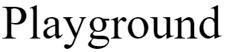 |
| Sans serif —A sans-serif typeface doesn't contain cross strokes on the extremities of characters. These typefaces usually have a clean, modern look that’s well suited to screen text, particularly at small sizes. |  |
| Monospace —A monospace typeface (also called a fixed-width typeface) uses the same amount of space for each character, so skinny letters such as i and l take up as much space as wider letters such as m and w. | 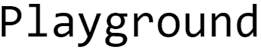 |
| Cursive —The cursive typefaces are designed to resemble handwritten pen or brush writing. |  |
| Fantasy —Fantasy typefaces usually are fanciful designs that have some extreme elements (such as being extra-thick). |  |
Compare the five common typeface categories by their letter shapes, from serif “feet” to the equal-width characters of monospace faces. section 4.2
When choosing a font for a web page, work through a few small questions:
- What role does the text play? A handwritten-looking cursive face can work for a gallery heading, while clean sans serif text suits navigation and footer links. section 15.4
- Will the text be small or viewed on small screens? Favor large counters, large apertures, a medium-to-large x-height, and low-to-medium stroke contrast for legibility. section 20.3
- Will one typeface do, or would a heading/body pairing add contrast? A single face can work, while two can create dynamism between headings and body text. section 20.3
- Can visitors access the chosen face? Use hosted or local font files rather than depending only on system fonts. section 18.25
A heading-and-body pairing
A portfolio page can use Playfair Display for headings and Open Sans for body text, with fallback families if those preferred faces are unavailable: font-family: "Playfair Display", Georgia, serif; font-family: "Open Sans", Verdana, sans-serif; The first declaration gives headings a display face; the second gives longer reading text a sans serif face. CSS uses font-family to request the typeface for an element. section 4.2 section 20.3
Font choice is only one part of typography. After selecting typefaces and sizes, refine the result with text-style properties, line height, and shorthand font declarations. For a quick experiment, try one face for everything, then try a heading/body pair and compare the mood and readability. section 18.12 section 18.25





