A font describes the adjustable qualities of displayed text, especially its size and style. A typeface is the overall letter design—such as Arial or Times New Roman—although font, typeface, and font family are often used interchangeably. Choosing them well makes a website easier to read and helps its visual tone fit its purpose. section 4.1.3 section 4.4
Start with readability. Body text on computer screens generally works best at 16–18 px; use 18 px or larger for long passages, and increase a thin-looking font slightly. Line height matters too: 1.5 or 2 times the font size is common. Too little spacing makes text hard to read, while too much makes lines feel disconnected. section 4.1.2
Choose a typeface and font qualities by matching the site’s audience and job:
- Use a clean sans serif for many websites. Arial, Verdana, and Helvetica are common choices; Verdana is presented as a strong option for onscreen reading. section 4.1.3
- Use more formal serif designs when a site needs to signal reliability and conservatism, such as a hospital or bank website. section 4.1.3
- Reserve scripts and handwriting-like styles for fitting contexts, such as wedding, bridal, catering, fashion, or artistic branding. section 4.1.3 section 4.1.4
- Use bold, attention-grabbing designs such as Impact mainly for advertising and headlines rather than ordinary body text. section 4.1.4
A practical website choice
A wedding planner can use a calligraphic or script look because it supports the desired mood. The same choice would be a poor fit for a sporting-goods store. For a site with substantial body copy, choose a readable screen-oriented option such as Verdana, set an appropriate size, and let distinctive display styles do limited work in branding or headings. section 4.1.3 section 4.1.2 section 4.1.4
A theme usually supplies default typeface, size, and line height; browser defaults commonly use a generic sans serif at 16 px for body text. In WordPress, look in Appearance > Customize > Typography, though the setting may be named Typeface or Text depending on the theme or plugin. Font plugins can add hundreds of Google font choices, and CSS can fine-tune values without requiring manual CSS writing. section 4.1.2 section 4.1.4
Before publishing, check font choices as part of the full typography system:
- Review text on different devices and screen sizes, and ensure headings, subheadings, and body text have a clear hierarchy. section 4.1.5
- Keep sizes, typefaces, and colors consistent across the site; choose text that remains easy to read for people with visual impairments. section 4.1.5
- Consider page-load speed and language coverage, since complex fonts can load more slowly and multilingual sites need suitable versions. section 4.1.5
- Ask an AI service for an objective critique after applying size, typeface, color, line height, and letter spacing, then verify its suggestions against the site’s goals. section 4.1.6
The Google Fonts plugin includes hundreds of typefaces for you to choose from.
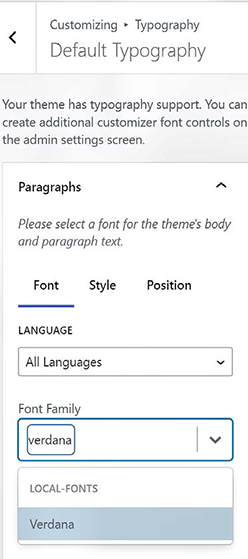
Browse a font-selection interface to compare a large collection of available typefaces before applying one to the site. section 4.1.2





