A font is one specific variation within a typeface: its weight, size, or style. Helvetica or Open Sans names a typeface; Open Sans Regular 400 and an extra-bold 800 variation are fonts within it. This distinction makes selection easier: choose a typeface that fits the product, then choose only the fonts needed for headings and body copy. section 8.1.1
Figure 8.2 This typeface is Open Sans, and all the styles shown are the fonts within the typeface. I frequently use the Open Sans Regular 400 font for my web projects when I want a readable font for the main body text.
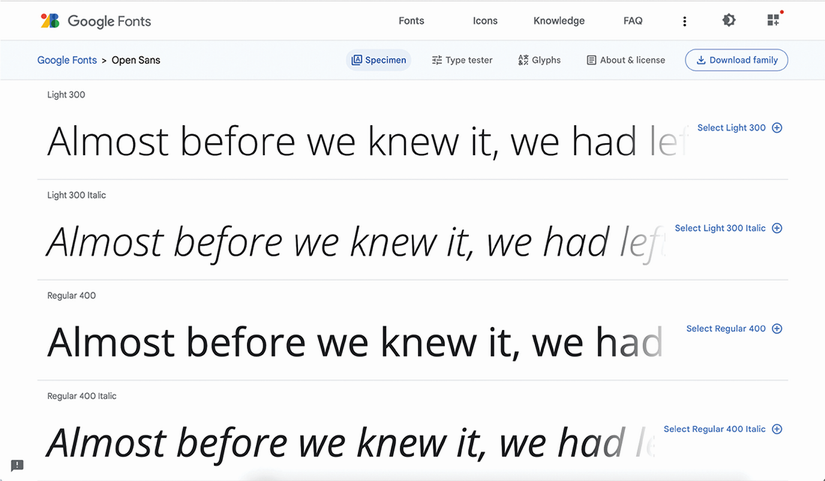
Open Sans is the typeface; the displayed styles are its individual fonts. A body-text choice such as Regular 400 is one font, not the whole family. section 8.1.1
Fonts do more than render words. Their visual treatment communicates mood, credibility, and brand voice before a reader has processed the copy. A whimsical font in an official communication can make it feel flippant, while another choice may make the same words seem formal, modern, friendly, or dark. section 8.0 section 8.2
Choose fonts by balancing the intended feeling with practical reading needs:
- Start with a broad classification. Serif fonts often feel classic or formal; sans serifs often feel modern; scripts can feel personal or welcoming; decorative styles tend toward novelty. section 8.1.2 section 8.3
- Use readable serif or sans serif fonts for long body copy. Decorative or handwriting-style fonts suit short, larger headings better than small paragraphs. section 8.2.1 section 10.4
- Check that the font remains legible at its intended size and has enough page contrast for quick scanning. Test on users or lower-resolution devices when uncertain. section 8.2.1
- Confirm the license allows web embedding. Google Fonts provides open-source fonts optimized for web use; Font Squirrel links to licensing information for its selections. section 8.2.1
A font’s weight is also a hierarchy tool. Headings and body text need enough visible difference in size or weight to signal their different roles. Using Regular 400 for body copy and Extra-bold 800 for a heading can establish contrast even when both come from the same typeface family. Similar sizes and weights make the hierarchy harder to see. section 8.2.2
Pairing fonts for a modern brand
A modern, less playful design can use Montserrat for titles and headings, then pair it with a readable body font such as Albert Sans. Avoid a thin or hairline body font at small sizes, very bold paragraph text, and specialty handwriting fonts for long passages. A regular or medium body weight provides a more neutral reading experience. section 10.4
Pairing fonts should create both cohesion and contrast. A simple approach is to use different weights from one family, or related typefaces from a superfamily such as Roboto and Roboto Slab. Pairing different categories can also work, but their letterforms should support the same intended tone. When two fonts share a category, make their visual differences clear enough to preserve hierarchy. section 8.2.2
Fine adjustments can protect readability rather than decorate text. Letter spacing may be changed slightly when it improves a line, but large increases or reductions make a block harder to read. For body text, also provide adequate line height and keep line length around 45 to 70 characters. section 8.2.6 section 8.3





