A wireframe is a bare-bones visualization of an interface. It maps where page elements live—such as text inputs, buttons, links, and dividers—without final colors or graphics. Use it to clarify a layout before committing to HTML, CSS, or Flask templates. section 7.3.1 section 7.3.3
Wireframes give UI/UX practitioners a movable layout for improving usability and give programmers a practical placement guide for building each page. An AI-generated wireframe can start the conversation, but it should be adjusted deliberately as requirements become clearer. section 7.3.1 section 7.4
A useful wireframe-first workflow is:
- Describe the application and request targeted UI guidance or wireframes. section 7.0 section 7.4
- Review each screen for its controls, repeated navigation, and user journey before writing code. section 7.3.1 section 7.3.3
- Turn repeated elements, such as a header and footer, into shared HTML rather than duplicating them across pages. section 7.3.2
- Request matching HTML and CSS, then refine and integrate the result into templates using developer judgment. section 7.3.3 section 7.4
Practice-test screens
A test-preparation interface is sketched as an entry page, a repeated question page, and a results page. The entry layout places a logo and navigation in the header, welcome text and a test-start link in the center, and policy links in the footer. Those sketches reveal that the header is common across screens, so it can become shared template code. section 7.3.1 section 7.3.2
Figure 7.5 This is a text wireframe diagram of the entry page. It is rough but gives us a good idea of what the page should look like.
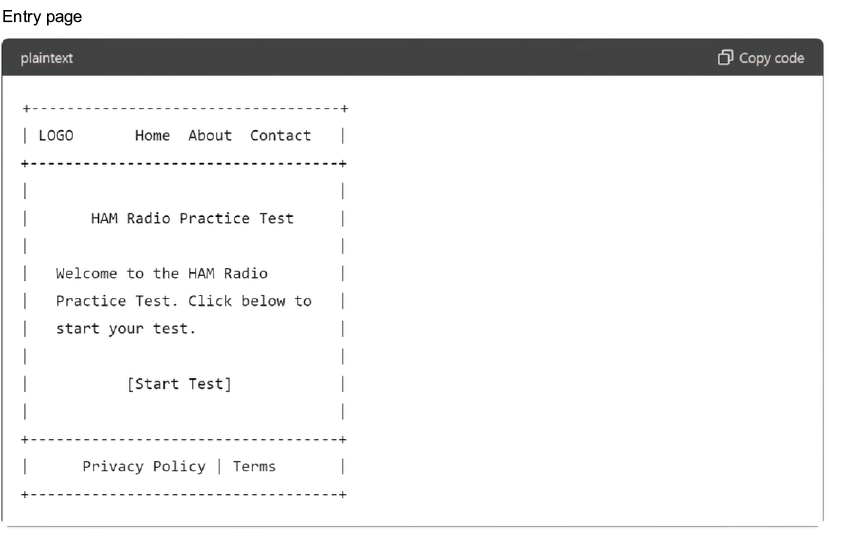
Inspect the rough entry-page diagram to see how a wireframe communicates hierarchy and placement without finished styling. section 7.3.1
Treat generated layouts and code as a fast starting point, not a finished design. Move from broad ideas to specific implementation prompts, test the result, and make strategic changes for functional and aesthetic fit. section 7.3.3 section 7.4


