A wireframe is a simplified visual blueprint for a website or application. It turns information architecture, research, and user flows into a rough page structure: what content appears, where it goes, how pieces relate, and what functionality a page should support. It is the skeleton of an interface, not its finished look. section 5.3.1 section 5.4
Wireframe before choosing colors, typefaces, graphics, precise spacing, or other aesthetic details. Separating structure from polish keeps attention on whether users can find information, understand groups of content, and move through tasks. Because a grayscale outline is inexpensive to change, it supports early feedback and reduces the cost of revising fully designed screens. section 5.3.1 section 5.3
Build a useful wireframe in this order:
- Start with research, business requirements, information architecture, and a defined user flow; these determine the content and paths the layout must support. section 5.3 section 5.4
- Place major content blocks and establish their priority before measuring details or styling components. section 10.2 section 5.3.1
- Group related items and use whitespace between unrelated groups so relationships are clear and pages are easier to scan. section 2.1.1
- Begin at low fidelity when direction is uncertain, then add detail only when it serves the feedback or approval you need. section 5.3.1
- Review the layout with users or stakeholders, revise it, then proceed into visual design, interaction design, or a prototype as appropriate. section 5.3 section 5.3.1
Travel homepage
A travel-site wireframe can reserve the top of the page for navigation, a hero area, and vacation-package search. Below that, it can place benefits first, trending destinations next, and a lower-priority group-travel section before the footer. The goal is to test content grouping and hierarchy before adding luxury imagery or refined measurements. section 10.2
Figure 5.8 An example of the top part of a wireframe that defines a site’s structure. This wireframe focuses on the hero section of a home page and the content immediately below it.
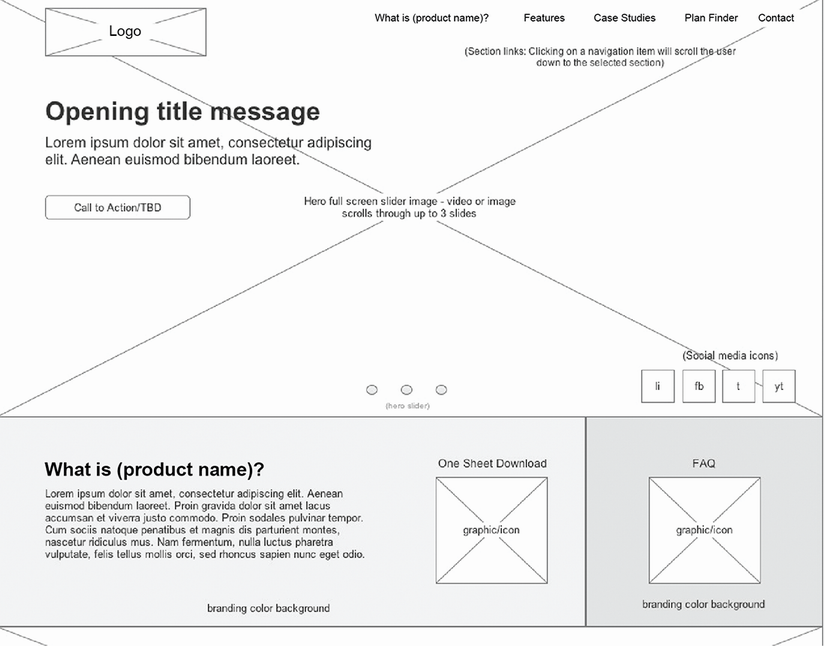
Use the structural outline to see how a hero section and the content immediately below it can be planned without visual styling. section 5.3.1
Wireframes sit between planning and detailed design. Information architecture organizes the site’s content, user flows map tasks, and wireframes give both a visible page-level form. Static visual design adds the aesthetic layer, while prototypes can test whether the proposed layout and interactions work before development. section 5.0 section 5.4


