A worker service is a headless .NET application for background work that does not need HTTP requests or a user interface. It uses the generic IHost for configuration, logging, and dependency injection (DI), without the ASP.NET Core HTTP-handling libraries. Choose one for jobs such as scheduled processing or handling events when no web endpoints are needed; it generally has a smaller footprint than an equivalent web application. section 34.2 section 34.4
Figure 34.2 ASP.NET Core builds on the generic IHost implementation. IHost provides features such as configuration, DI, and configuration. ASP.NET Core adds HTTP handling on top of that by way of the middleware pipeline, Razor Pages, and API controllers. If you don’t need HTTP handling, you can use IHost without the additional ASP.NET Core libraries to create a smaller application.
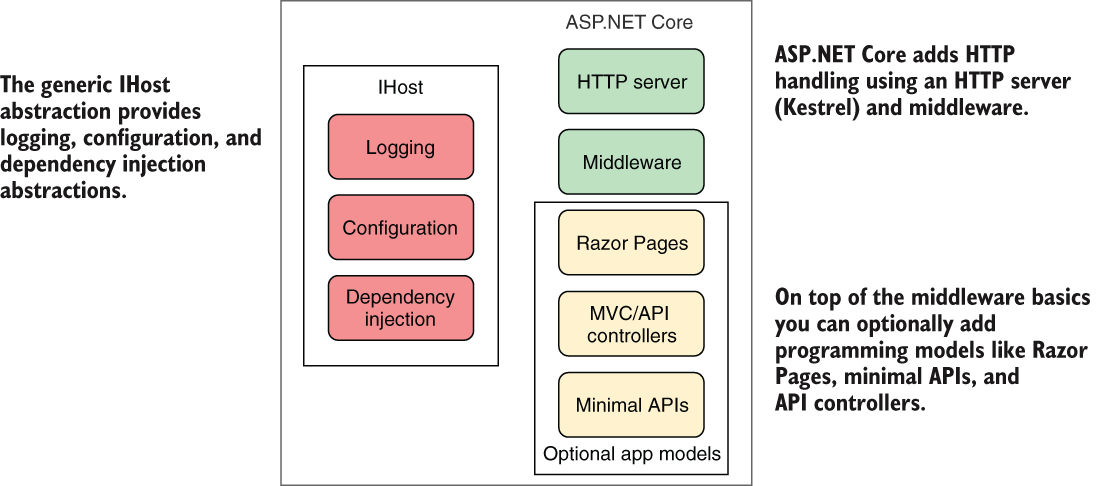
The figure separates the generic host’s shared services from the HTTP features a worker leaves out. section 34.2
To make a small worker:
- Create a Worker Service project in Visual Studio or run `dotnet new worker`. The template provides `Worker.cs` and `Program.cs`. section 34.2.1
- Put the long-running task in a `BackgroundService`. Its `ExecuteAsync` method runs when the app starts; keep working until the supplied cancellation token signals shutdown. section 34.2.1 section 34.4
- Register the task with `AddHostedService<T>()`. In the .NET 7 template, `Program.cs` uses `Host.CreateDefaultBuilder()` and `ConfigureServices()` to build and run the host. section 34.2.1 section 34.4
Listing 34.6 Default BackgroundService implementation for worker service template
public class Worker : BackgroundService                    #1
{
    private readonly ILogger<Worker> _logger;
    public Worker(ILogger<Worker> logger)
    {
        _logger = logger;
    }

    protected override async Task ExecuteAsync(            #2
        CancellationToken stoppingToken)
    {
        while (!stoppingToken.IsCancellationRequested)     #3
        {
            _logger.LogInformation(
                "Worker running at: {time}", DateTimeOffset.Now);
            await Task.Delay(1000, stoppingToken);         #4
        }
    }
}
The template’s worker logs once per second and passes the shutdown token to its delay, making the background loop easy to inspect. section 34.2.1
A worker that saves exchange rates
Register an exchange-rates HTTP client, an exchange-rates hosted service, and an EF Core database context in `ConfigureServices()`. The background task can then save rates to a database for other applications to use, without serving a UI itself. When a long-running hosted service needs a scoped dependency, create a DI scope rather than treating that dependency as a singleton. section 34.2 section 34.2.1 section 34.4
During development, a worker can run as a console application. For production, optional hosting packages enable Windows Service or Linux systemd integration so the operating system can manage a long-running worker. Deployment needs a scaling decision too: running ten ordinary workers that each update rates on a timer produces ten updates. A separate single-instance worker avoids that duplication; if multiple worker instances are necessary, Quartz.NET clustering can coordinate job triggers through a database. section 34.2.2 section 34.3.3








