Access control decides what an authenticated user may do. Authentication proves identity; authorization applies permissions to that identity. On a multiuser site, this keeps readers from editing articles and prevents rival bands from changing one another’s profiles. section 1.1.4 section 6.1
In Django, begin by requiring a login, then add view-specific checks when access depends on ownership or relationships. Session middleware determines whether a user is logged in before the view runs; the request then exposes the authenticated user to the view. section 6.1 section 6.4
A practical access-control flow is:
- Wrap a protected view with @login_required so anonymous visitors are redirected to a login page. section 6.3
- Resolve the requested object, such as a Musician, with get_object_or_404(). section 6.4
- Compare request.user’s profile relationships with the requested object or its band membership. section 6.4
- Render the permitted response, or raise an error when the user is not allowed. section 6.4
Restricting a musician profile
A musician-profile view first requires login. It then permits access when the current user owns that musician profile or shares a band with that musician. A user who is neither the musician nor a bandmate receives a 404 response. This separates the broad “is logged in” check from the narrower “may view this profile” rule. section 6.4 section 6.3
@login_required is intentionally simple: any active authenticated account may proceed. More detailed permissions belong in the relevant view, where the rule can use the requested object and the current user’s related data. Django’s User can be extended through a profile linked by OneToOneField, or replaced with a custom user model. section 6.3 section 6.8
Figure 6.4 Authentication verification steps for visiting a @login_required wrapped view
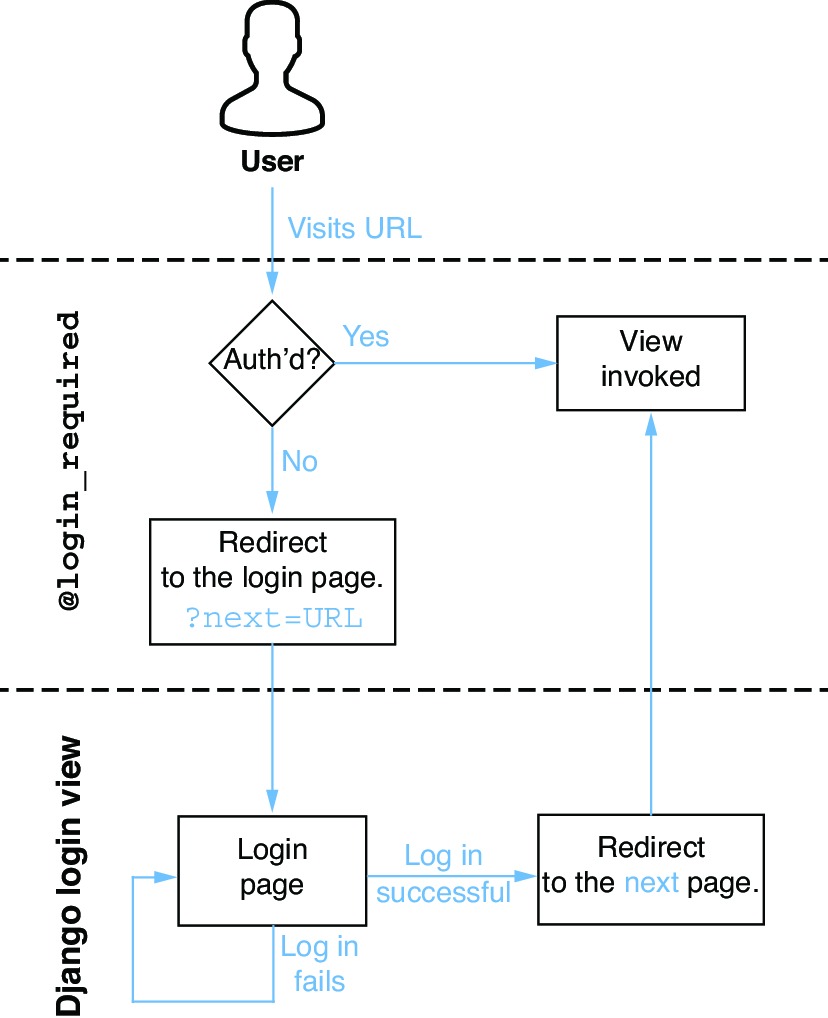
Follow the request path to see where Django verifies login status before allowing a @login_required view to run. section 6.3



























