Access control means deciding what each person may do with a website or protected content. Give people only the access they need instead of automatically granting administrator control. section 2.8
For a WordPress site, common roles limit responsibility in different ways:
- Administrator: controls users, settings, themes, plugins, and site content. section 2.8.1
- Editor: manages site content and moderates posts, but cannot change users, settings, themes, or plugins. section 2.8.1
- Author and Contributor: create or manage their own posts with different limits on deletion, categories, publishing, and file uploads. section 2.8.1
- Subscriber: changes only a profile or password. section 2.8.1
Add a collaborator safely
Open Users > Add New, choose the smallest suitable permission level, and decide whether to email the new user their username and password-creation link. Keep only one or, at most, two administrators; create a custom role when the standard roles do not fit. section 2.8 section 2.8.1
Access control also applies to media and automated visitors. Obtain written permission from people appearing in photos or videos, check copyright concerns, and use a robots.txt file when restricting access for search engines or AI—after backing up site files. section 8.7.2 section 2.4.1
Figure 2.5 In the Add New User screen, you specify a permission level for someone you’re allowing into the backend.
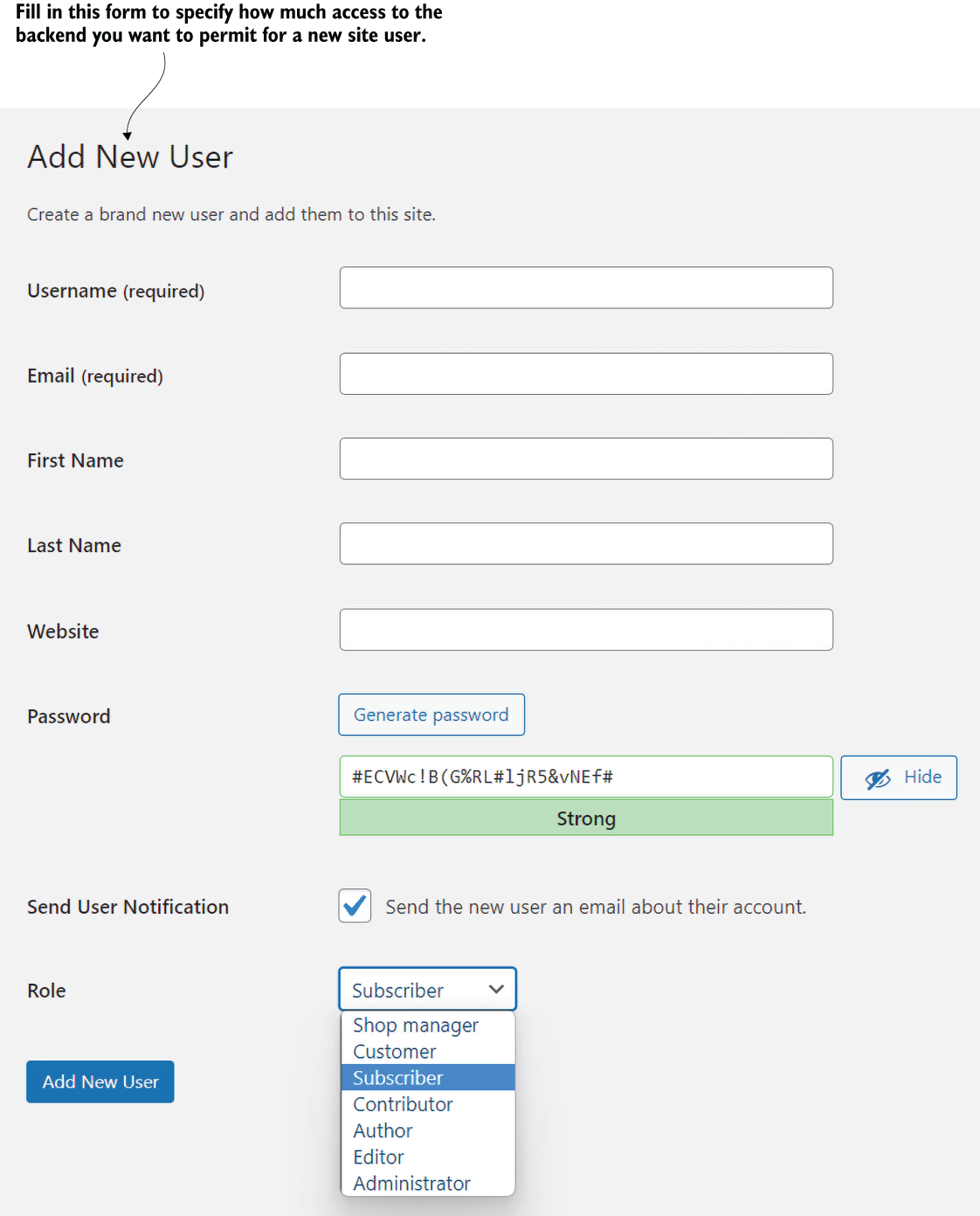
Use the Add New User screen to select a permission level before allowing someone into the site backend. section 2.8



























