A Bézier curve defines how a value changes over time. In CSS transitions, the browser uses the curve as a timing function: time moves from left to right, while the curve describes progress toward the final value. A straight line produces linear motion; curved paths create acceleration or deceleration. section 15.2.1
A cubic Bézier timing function lets you control transition behavior:
- Use a keyword timing function for a predefined curve. section 15.2.1
- Use cubic-bezier() with four values to define a custom curve. section 15.2.1
- Adjust the curve’s control points to create gentler, more drastic, accelerating, decelerating, or bouncing motion. section 15.2.1
Editing a transition curve
Inspect a transitioning element in Chrome or Firefox DevTools and open the timing-function editor. Drag the curve handles to change the motion, then use the generated cubic-bezier() value in the stylesheet—for example, cubic-bezier(0.45, 0.05, 0.55, 0.95). section 15.2.1
Figure 15.4 The Bézier curves of timing functions illustrate how the value changes over time.
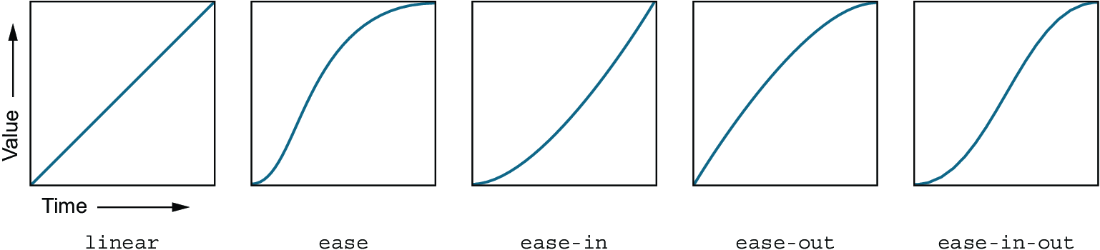
Compare timing-function curves to see how each one changes a value across a transition’s duration. section 15.2.1




