A Bézier curve turns a plain, mechanical transition into motion with a deliberate rhythm. In interface animation, it maps elapsed time to progress: a card can ease into view, a toggle can move quickly then settle, and a dialog can briefly pull back or overshoot before resting. The curve does not change an animation’s start or end value; it changes how the animated property travels between them. section 11.1.1 section 11.1.4
A curve is built from points and a parameter t running from 0 to 1. At t = 0 it is at the start point, and at t = 1 it reaches the end point. Between those values, weighted control points pull the path into shape. A quadratic curve has one control point; a cubic curve has two, letting the beginning and ending behavior be shaped independently. section 11.1.2 section 11.1.3
Figure 11.1 A cubic Bézier curve has two control points.
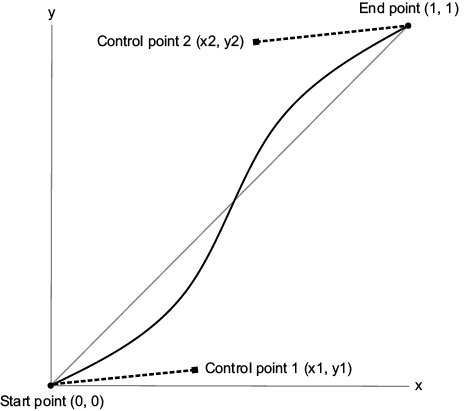
The two inner handles of a cubic curve influence how it leaves its fixed start and approaches its fixed end. section 11.1.2
For CSS timing, the horizontal axis is time and the vertical axis is property progress. A steep part of the curve means rapid change; a shallow part means slow change. The endpoints are fixed at (0, 0) and (1, 1), so CSS exposes only the two inner control points. Their coordinates become the four arguments to cubic-bezier(x1, y1, x2, y2). section 11.1.4 section 11.2.1
Read the control points as a practical tuning tool:
- The first point, (x1, y1), chiefly controls the start: x1 affects when initial acceleration occurs, while y1 affects its amount. section 11.5
- The second point, (x2, y2), chiefly controls the finish: x2 affects when deceleration begins, while y2 affects final deceleration. section 11.5
- Keep x1 and x2 from 0 through 1. y values commonly stay in that range, but a negative y creates anticipation and a y above 1 creates overshoot. section 11.2.1
- Use cubic curves for CSS animation: their two controls can independently make motion slow at the start, quick at the end, or S-shaped. section 11.1.3
Make a toggle feel fast but gentle
A toggle can translate over 1000ms with cubic-bezier(0.2, 0.9, 0.1, 1.0). Its early steep slope produces a fast start, while its flatter ending slows the final approach. In production, a shorter duration such as 250ms keeps the interaction crisp. section 11.2.1
CSS also provides ready-made cubic-Bézier timing keywords. linear keeps a constant rate and can feel mechanical. ease accelerates mildly and then decelerates; ease-in delays most motion until late; ease-out moves early and lands softly; ease-in-out balances acceleration and deceleration. Start with a keyword when its motion matches the interaction, then use a custom curve when the interface needs a distinct response. section 11.2.3 section 11.3
Match the curve to the job. Entrance motion benefits from moderate or fast initial acceleration and gentle deceleration. Brief interactive feedback needs a fast response, short duration, and often a symmetrical curve for reversible interactions. For emphasis, an out-of-range curve can make a dialog shrink slightly, expand beyond its final scale, and settle back. section 11.3.1 section 11.3.3
A useful check is to look for a curve that delays nearly all visible change and then rushes to complete it: that pattern feels jumpy. Adjust toward gradual acceleration and deceleration when a fade or transition should read as smooth and professional. section 11.4




