A baseline represents normal behavior or expected security requirements. Comparing current activity or resource configuration with that reference helps reveal anomalous behavior, misconfiguration, and compliance gaps. section 2.2.5 section 10.4
Azure security tooling applies baselines in several ways:
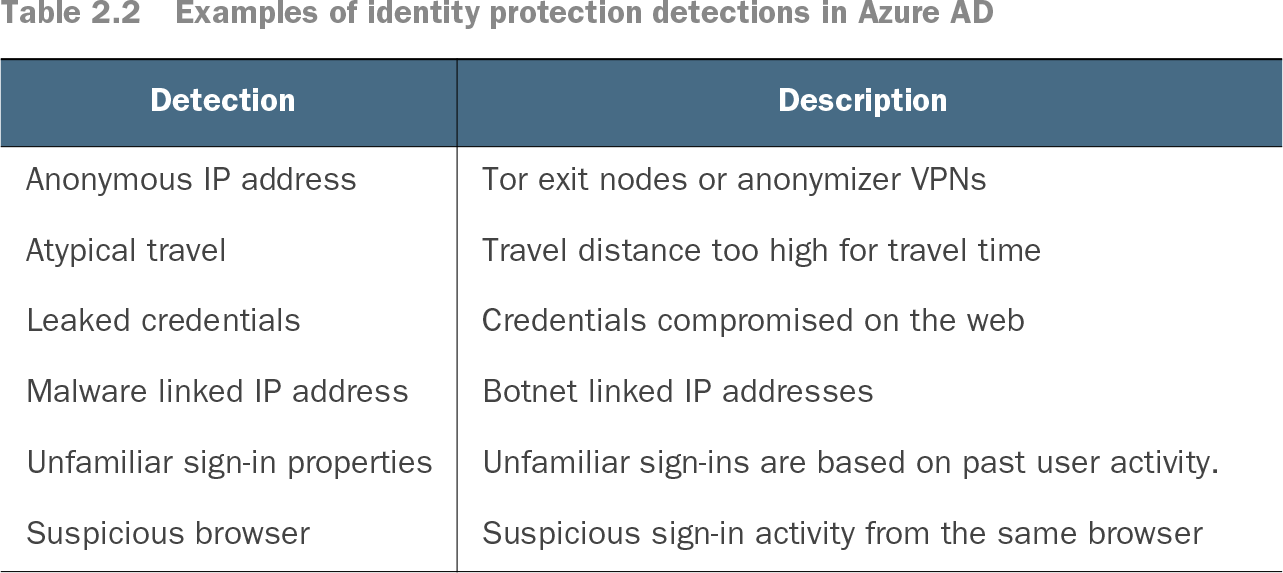
- Identity Protection learns usual user behavior and sign-in patterns, then flags risks such as unfamiliar locations, atypical travel, leaked credentials, and suspicious browsers. section 2.2.5
- Sentinel UEBA builds a multidimensional baseline for each entity from logs, alerts, past activity, peer activity, and organizational behavior. section 8.6
- Defender for Cloud uses the Microsoft Cloud Security Benchmark and regulatory standards to assess resource configurations, identify misconfigurations, and generate recommendations. section 10.4
Anomalous access
If Bob signs in from Beijing for the first time, no organizational peers sign in there, and he accesses customerDataCSV, UEBA can treat the location and file access as anomalous. section 8.6.1
Table 2.2 Examples of identity protection detections in Azure AD (view table figure)
Review representative Identity Protection detections, including anonymous IP addresses, atypical travel, leaked credentials, malware-linked addresses, unfamiliar sign-ins, and suspicious browsers. section 2.2.5