A bounding box is a rectangular coordinate representation used to localize a target object within an image. In an object-detection workflow, labeling users draw boxes around objects before training begins. section 2.3.2
Use bounding boxes to connect these workflow stages:
- Label images by drawing boxes around target objects. section 2.3.2
- Save the images and generated label data in a labeled dataset. section 2.3.2
- Trigger model training when new labeled data arrives. section 2.3.2
Automated object-detection training
A labeling pipeline opens a user interface over images from a raw dataset. After users draw bounding boxes, the resulting labels enter a labeled dataset and trigger the training pipeline. section 2.3.2
Figure 2.19 Automated object detection model training in Pachyderm. The training process starts automatically when new images are labeled.
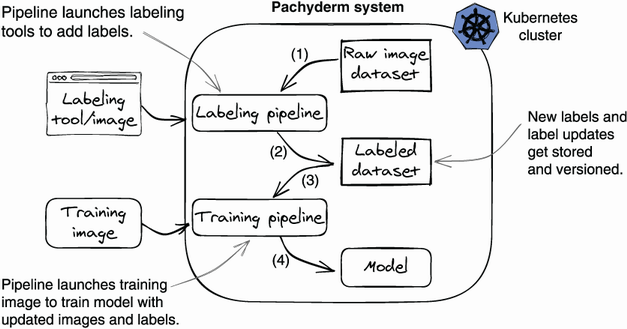
Shows how newly labeled images automatically start object-detection model training. section 2.3.2







