A bounding box is a rectangle that encloses an object in an image. Object detection uses boxes to locate multiple objects and labels to identify them, avoiding the cost of marking every pixel. A useful box is just large enough to contain the complete object: oversized boxes can include irrelevant image content, while undersized boxes miss part of the object. section 8.0 section 8.4
Represent each box with four absolute coordinates, conventionally [x1, y1, x2, y2], where the first pair gives one corner and the second pair gives the opposite corner. For k objects, PyTorch stores boxes in a float32 tensor of shape (k, 4), alongside an int64 labels tensor of shape (k). section 8.4.2
Use bounding boxes as the data contract for a detection dataset:
- Return each image together with a dictionary containing boxes and labels; images may contain different numbers of objects. section 8.4.2
- For a batch, use a custom collate function that returns a list of image tensors and a list of target dictionaries rather than padding boxes. section 8.4.2
- Train Faster R-CNN with model(inputs, labels), sum its returned partial losses, backpropagate, and update the optimizer. section 8.4.1
Toy MNIST detection
Construct a 100 × 100 canvas containing a random number of MNIST digits at random locations. Store each digit's absolute corners, such as [14, 60, 42, 88], with its class ID, then train Faster R-CNN to recover both location and identity. Predictions can include several nearby boxes, so scores help distinguish strong detections from weak alternatives. section 8.4.2
Figure 8.8 A stop sign as the target for bounding-box-based object detection. The green box shows the ground truth, a box just large enough to contain the entire object. The red box shows a potential prediction, which is close but not quite correct. Water doesn’t obey the whimsical desires of the lowly stop sign.
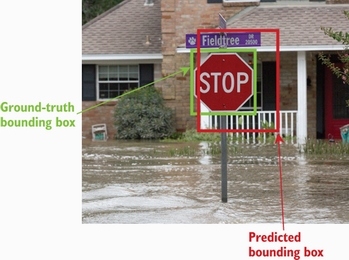
Compare a green ground-truth box, sized just to contain a stop sign, with a slightly inaccurate red prediction. section 8.4







