liveBook · Manning

Bounding box

As explained in Hugging Face in Action

A bounding box is a rectangular region specifying the position of an object within an image or video.

A bounding box is a rectangle that locates a detected object within an image or video. Object detection uses boxes alongside object labels and confidence scores. section 4.2

A detection result commonly provides:

  • scores: confidence values for detected objects section 4.2.1
  • labels: indices mapped through model.config.id2label section 4.2.1
  • boxes: coordinates used to draw rectangles on the original image section 4.2.1

Draw detections with DETR

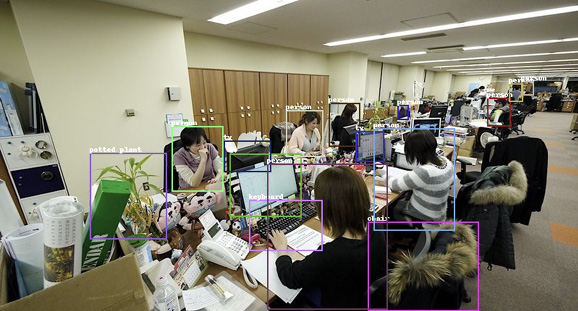
Process an image with facebook/detr-resnet-50, post-process predictions with the image target size and a 0.9 threshold, then draw each returned box with ImageDraw.rectangle(). Add the mapped label near the rectangle. section 4.2.1 section 6.2.1

Figure 4.9 The bounding box for each detected object is drawn on the original image.
A group of people working in an office

Description automatically generated

View an annotated image with a bounding box drawn around every detected object. section 4.2.1

How Hugging Face in Action covers it

How deep it goes
Explains detection outputs, threshold filtering, coordinate scaling, and rectangle drawing without covering detector internals.
Examples
Uses office imagery plus dog-and-cat imagery, with labels, confidence values, coordinate arrays, and annotated rectangles.
What it assumes
Assumes an image and a pretrained detection model, while demonstrating preprocessing, inference, post-processing, and visualization.
What you can do after
Apply it via Hugging Face Transformers and PIL to inspect detections and annotate images with labeled rectangles.
How it connects
Connects bounding boxes to object detection, image segmentation, confidence scores, pretrained models, and multimodal models.

Also explained in

Compare how 8 books explain bounding box →

Related concepts

This explainer was generated by Manning's knowledge graph from the text of Hugging Face in Action. The section links point to the parts of the book it draws on.





