Caching stores frequently reused workflow files so later jobs can retrieve them instead of downloading them again. It is especially useful for dependencies because each job starts on a fresh machine; restoring cached packages reduces workflow wait time and network usage. Cache storage consumes paid disk space, so speed improvements should be balanced against storage cost. section 12.3.2 section 12.5
GitHub’s cache action saves and restores files using a unique cache key. A key should identify inputs that make cached content valid: a NuGet cache, for example, can combine the runner operating system with a hash of packages.lock.json. When the dependency-file hash changes, the cache is not reused. section 12.3.2
Choose the setup approach that matches the dependency manager:
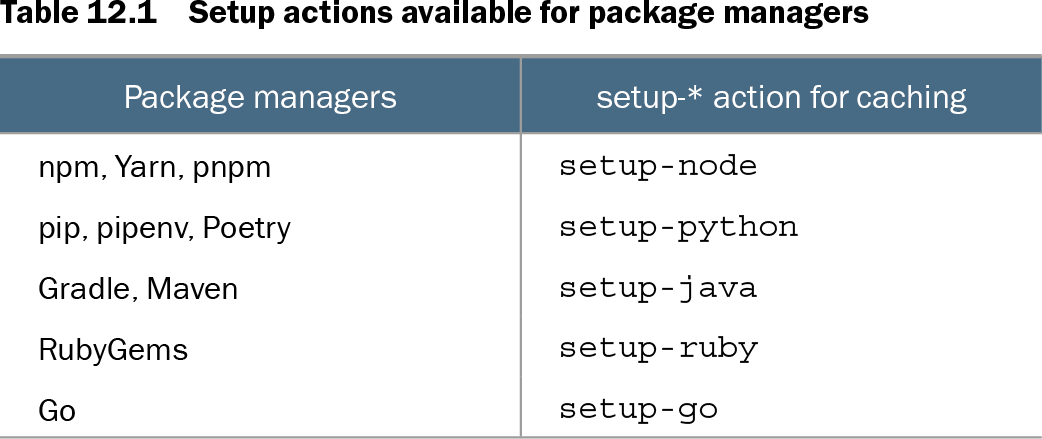
- Use package-manager setup actions for low-effort caching, including setup-node for npm, Yarn, and pnpm; setup-python for pip, pipenv, and Poetry; and setup-java for Gradle and Maven. section 12.3.2
- Use actions/cache when the cache path and key need explicit configuration, such as ~/.nuget/packages for NuGet. section 12.3.2
- Use cache-from and cache-to with docker/build-push-action when Docker builds should use the GitHub Actions cache. section 12.3.2
Cache npm dependencies
Configure actions/setup-node with a Node version and cache: 'npm'. The setup action handles the package-manager cache, avoiding a separate manually defined cache path and key for this case. section 12.3.2
Key a NuGet cache to dependency state
Cache ~/.nuget/packages with a key containing runner.os and hashFiles('**/packages.lock.json'). hashFiles calculates SHA-256-based hashes for matching files; unchanged lockfiles permit reuse, while changed dependencies require a new cache. section 12.3.2
Table 12.1 Setup actions available for package managers (view table figure)
| Package managers |
setup-* action for caching |
|---|---|
| npm, Yarn, pnpm |
setup-node |
| pip, pipenv, Poetry |
setup-python |
| Gradle, Maven |
setup-java |
| RubyGems |
setup-ruby |
| Go |
setup-go |
Compare package managers with their corresponding setup actions before choosing automatic dependency-cache configuration. section 12.3.2
Caching can also separate CI concerns: jobs sharing a cache key can reuse cached artifacts rather than repeat expensive work. Treat cache reuse as one performance option alongside sparse checkouts and runner selection, while monitoring both action-minute and storage spending. section 8.4.2 section 12.5