A canary deployment sends a small percentage of traffic to updated resources before expanding exposure. Successful requests justify increasing the percentage; errors trigger debugging and a return to the previous environment. section 9.2.3
Apply the pattern as a controlled rollout:
- Prepare updated green resources alongside the existing blue resources. section 9.2.3
- Route a limited share of requests to green, such as 10% green and 90% blue. section 9.2.3
- Observe errors and functionality, then increase green traffic gradually when results remain acceptable. section 9.2.4
- Reduce green traffic and debug when failures appear; retain blue until the regression window provides confidence. section 9.2.4
Canarying a database change
For stateful infrastructure, applications first write to both blue and green databases, then write exclusively to green, and finally read from green. Automation may reconcile duplicated data, while incremental rollout preserves a route back to blue. section 9.3.3
Figure 9.7 Configure the global load balancer to run a canary test and send a small percentage of traffic to green resources.
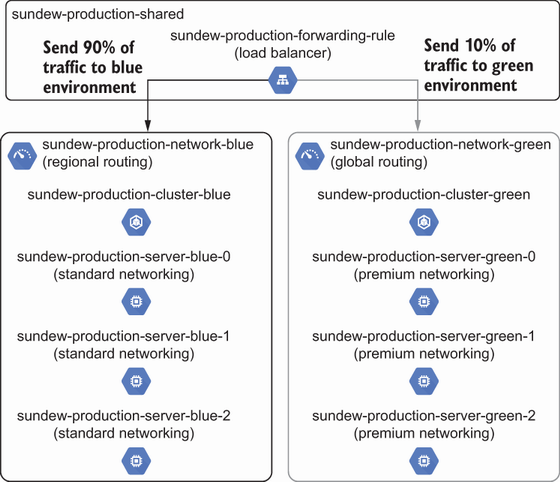
Shows a global load balancer sending a small traffic percentage to green resources during a canary test. section 9.2.3






