A canary deployment runs a new application version alongside the stable version and sends only a small share of requests to it. Check how the new version behaves before exposing everyone to it. If it fails, fewer users encounter the bad release. section 7.2 section 15.3
For stateless pods, one approach is to run separate stable and canary Deployments. Give the canary Deployment far fewer replicas, and configure a Service to send traffic to pods in both. The Service spreads requests across those pods, so most traffic reaches the stable version. Once the canary passes your checks, update the stable Deployment and delete the canary Deployment. Labels such as `app` and `rel` help distinguish each application and release. section 15.3.1 section 7.2.1
Figure 15.11 Implementing the Canary deployment strategy using two Deployments
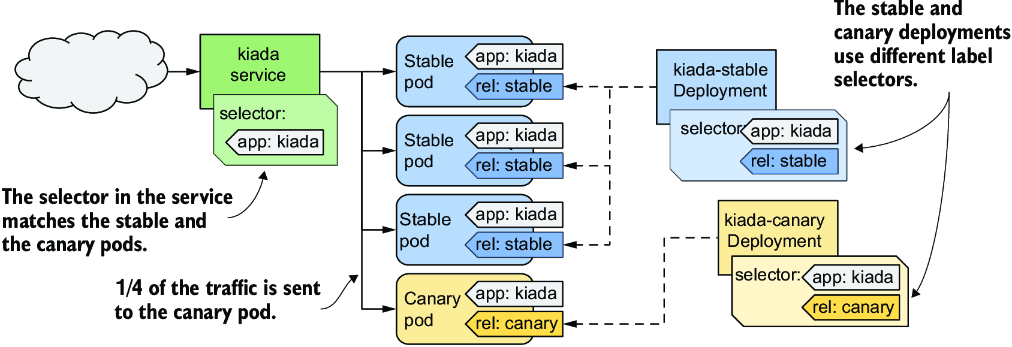
The diagram shows how two Deployments let a Service reach both stable and canary pods while keeping the canary group small. section 15.3.1
Pause a Deployment rollout
During a rolling update, pause after the first new pod appears: `kubectl rollout pause deployment kiada`. Check the application while both versions run, then continue with `kubectl rollout resume deployment kiada`. This is a manual canary check, not automatic approval. Raising `minReadySeconds` can also delay progress, but it delays every update step rather than just the first. section 15.2.4 section 15.3.1
Watch for mixed-version web resources during a paused rollout: a browser may receive HTML, CSS, JavaScript, or images from different versions. Session affinity or a backwards-compatible, two-step application update can help avoid rendering problems. section 15.2.4
Canary a StatefulSet pod
A StatefulSet cannot use `kubectl rollout pause`. With three replicas, set its RollingUpdate partition to `2` to update only the pod with ordinal `2`; inspect that pod before lowering the partition to continue. Setting the partition to `3` first stages a template change without updating any pods. section 16.3.2






