A backup is a separately retained copy used to restore data after loss or corruption. For Kafka, first decide whether a backup is needed: data may be reproducible from an original database, or may matter only for a few seconds. A strategy becomes important when Kafka is the single source of truth for business data. section 16.2
Why snapshot timing matters
Periodic filesystem snapshots stored off-site are familiar to operations teams, but they duplicate Kafka’s replicated data. They can also produce an incomplete backup: if Partition A moves from Broker 1 to Broker 2 between broker snapshots, neither snapshot sequence may contain a complete copy. section 16.2
Choose the recovery posture according to how Kafka is used:
- Reproduce data from the original database when Kafka only transports persisted database data. section 16.2
- Avoid a Kafka backup when messages are needed only briefly and restoration would provide little value. section 16.2
- Consider mirroring to additional data centers for important data; Kafka MirrorMaker 2 simplifies multi-data-center operation, while backup and recovery may still be appropriate. section 4.4
- Pair backups with monitoring, automation, redundancy, and disaster recovery planning rather than treating backup as the whole resilience strategy. section 4.4 section 15.5.1
Figure 4.12 Kafka alone is usually not enough. The Kafka ecosystem offers numerous components to integrate Kafka into our enterprise landscape and thus build a streaming platform.
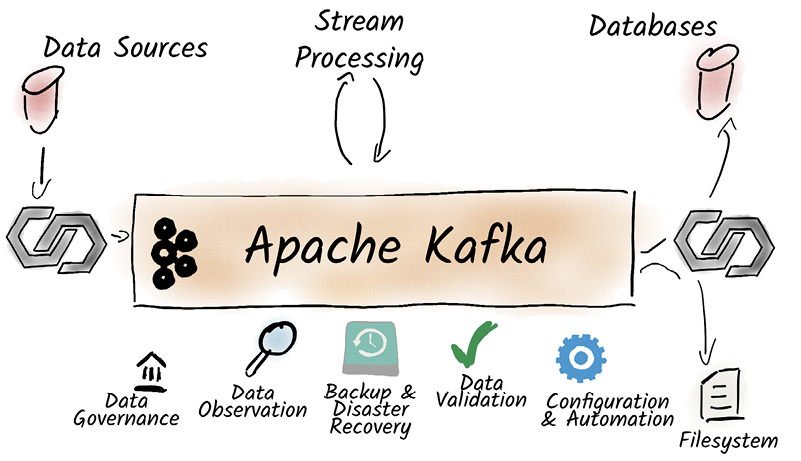
Use the Kafka ecosystem view to place backup and recovery alongside monitoring, automation, compliance, and other components required for an enterprise streaming platform. section 4.4









