A backup is a separate recovery copy that protects data when failures, deletions, schema changes, software bugs, or regional outages damage the active system. In Apache Iceberg, recovery must preserve the synchronized relationship between physical data files and transactional metadata, rather than copying data alone. section 5.1.3 section 11.3.7
A practical backup design combines several layers:
- Automate exports of Iceberg metadata files and catalog state; hourly backups can provide a baseline for frequently changing transactional tables. section 11.3.7
- Replicate complete table paths, including metadata, data, and snapshots directories, to another region or account. section 11.3.7
- Test restoration by registering tables from copied metadata.json files, restoring associated data, validating snapshot lineage, and updating the catalog when needed. section 11.3.7
Automated Iceberg recovery
A recovery DAG in Apache Airflow or Dagster can distinguish a single-table loss from a catalog outage, restore replicated files and metadata, validate lineage, and expose failures to monitoring systems. section 11.3.7
Figure 11.6 Regular backups, not just of data files but also of metadata files and catalog state, can speed disaster recovery and ensure that storage is in sync with the catalog after recovery.
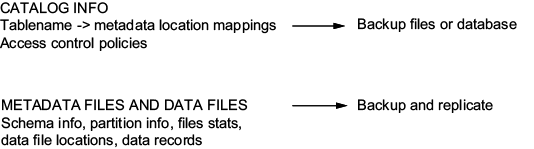
Use the recovery-layer diagram to relate data-file backups, metadata exports, catalog state, and storage replication. section 11.3.7









