Cloud computing delivers computing resources and services on demand over a network. It lets teams place applications in global datacenters, scale environments quickly, and pay for the resources they use instead of managing servers, disks, networks, power, and cooling themselves. section 1.1.1
For application migration, the main trade-off is between infrastructure as a service (IaaS) and platform as a service (PaaS). IaaS preserves portability by running application components in virtual machines, but increases operating costs. PaaS reduces running costs through managed services, but migration can require substantial application changes and create provider lock-in. section 1.1.1
Containerizing the application before choosing a cloud platform provides a practical migration path:
- Package each application component in a container and encode installation steps in Dockerfiles. section 1.1.1
- Describe deployment with Docker Compose or Kubernetes manifests so the same application model can move between environments. section 1.1.1
- Choose a managed container service by comparing platform support, image builders, Compose integration, operations, identity, ease of use, and growth path. section 14.5
A portable cloud deployment
A distributed application packaged as containers can run on Azure Kubernetes Service, Amazon Elastic Container Service, another container platform, a datacenter, or a developer laptop without changing its code or technology stack. section 1.1.1
Figure 1.1 The original options for migrating to the cloud were to use IaaS and run lots of inefficient VMs with high monthly costs, or use PaaS and get lower running costs but spend more time on the migration.
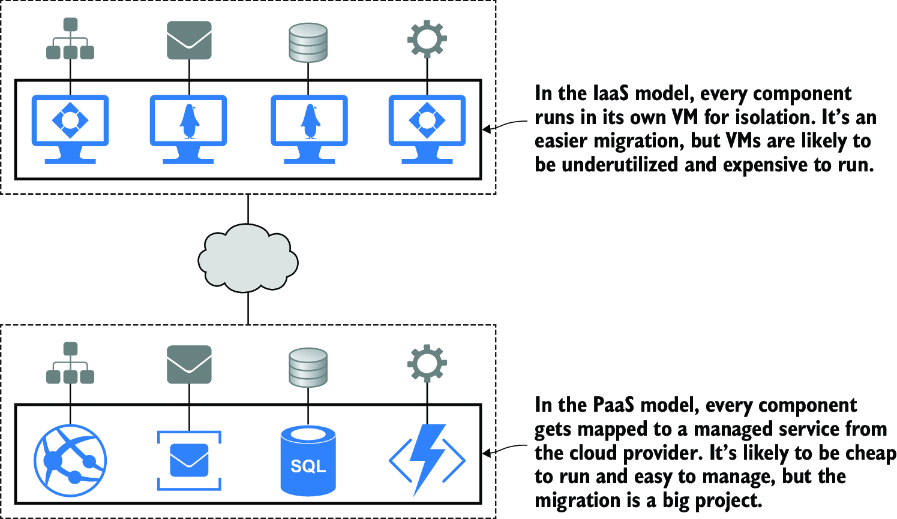
Compare the original IaaS and PaaS migration choices by infrastructure cost, migration effort, and portability. section 1.1.1
Figure 1.2 The same app, migrated to Docker before moving to the cloud. This application has the cost benefits of PaaS with the portability benefits of IaaS and the ease of use you get only with Docker.
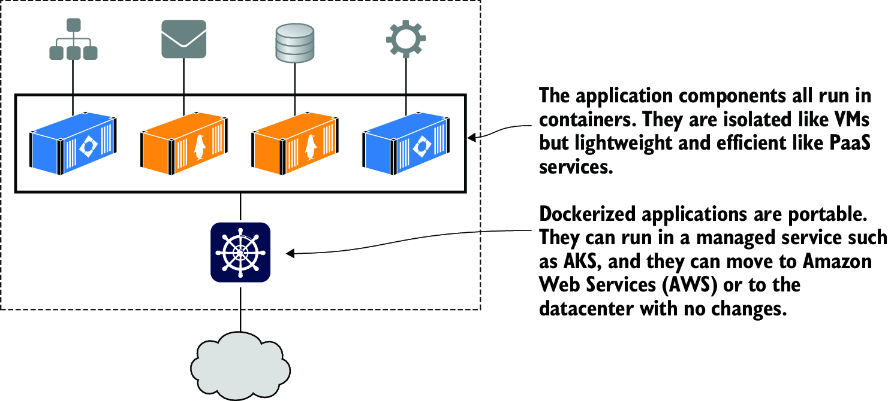
See how moving to Docker combines the cost benefits of managed platforms with the portability of virtual-machine-based infrastructure. section 1.1.1









