Cloud computing means using computing services on someone else’s servers instead of buying and maintaining all the equipment yourself. A platform such as Microsoft Azure makes computing, networking, storage, and other services available over the internet. You might use them to host a website, protect files, or run an application that grows with its users. section 1.1 section 1.0
The useful trick is abstraction: the provider handles some underlying technology so you can focus on the work you need to do. How much it handles depends on the service model: section 1.1
The three common service models divide responsibility differently.
- Infrastructure as a service (IaaS) lets you rent computing, networking, and storage. Virtualization allows multiple virtual machines to share physical hardware without interfering with one another. section 1.1
- Platform as a service (PaaS) also abstracts the operating system and several maintenance tasks, including updates and patches. section 1.1
- Software as a service (SaaS) provides hosted software that you use while the provider handles nearly everything else. section 1.1
Figure 1.2 Cloud computing abstraction layers. The responsibility shifts between you and the cloud provider across IaaS, PaaS, and SaaS. As you move up the layers, the provider manages more—from physical infrastructure and virtualization in IaaS, to the OS and runtime in PaaS, and nearly everything in SaaS—leaving you to focus on just your applications and data.
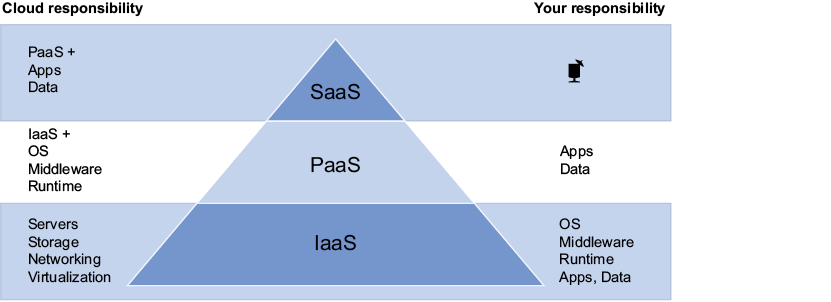
Compare the layers to see how responsibility shifts from you to the provider as you move from IaaS to PaaS to SaaS. section 1.1
An image-processing application
Suppose images arrive by email and need to be stored and compressed. Azure services can be connected to build that workflow, illustrating cloud infrastructure and serverless architecture through a practical task. section 2.0
Cloud resources can scale, and Azure regions let you place applications closer to users or spread workloads for resilience. Cost still needs attention: a service left running can incur charges. Azure offers pay-as-you-go services, VM pricing options, and some free tiers; choose and monitor resources rather than assuming that cloud means free. section 1.0 section 1.4 section 1.8









