Compliance is the state of meeting applicable policy or rule requirements. In Azure, it is tracked as a security posture: resource configurations are assessed against technical controls, standards, benchmarks, and policy definitions so teams can find and address gaps. section 6.5 section 10.2.2
Microsoft Defender for Cloud maps resource assessments to requirements in standards such as MCSB, PCI DSS 3.2.1, ISO 27001, CMMC Level 3, and HIPAA/HITRUST. Results update as resource configurations change, supporting ongoing assessment rather than a one-time review. Some controls remain unavailable for automatic assessment, especially procedure- or process-related controls. section 6.5 section 6.5.1
Use compliance monitoring as part of a remediation workflow:
- Assign owners and due dates to security recommendations, then track overdue or unassigned work in Security Posture. section 6.4.3
- Open Regulatory Compliance in Defender for Cloud, choose a standard, expand a failing control, and follow Recommendation Details guidance for failed resources. section 6.5.1
- Allow time for dashboard results to refresh after changes; the regulatory compliance blade can take up to 12 hours to update. section 6.5.1
- Apply Azure Policy at the highest appropriate management group, subscription, resource group, or resource scope to evaluate existing and future deployments. section 10.2.2
Restricting VM sizes with Azure Policy
To enforce an allowed VM SKU list, assign the Allowed virtual machine size SKUs policy definition at a subscription or other scope and provide the permitted SKU values as assignment parameters. Azure Policy evaluates existing resources and future deployments for compliance; a waiver exemption can explicitly accept noncompliance for a resource group. section 10.2.2
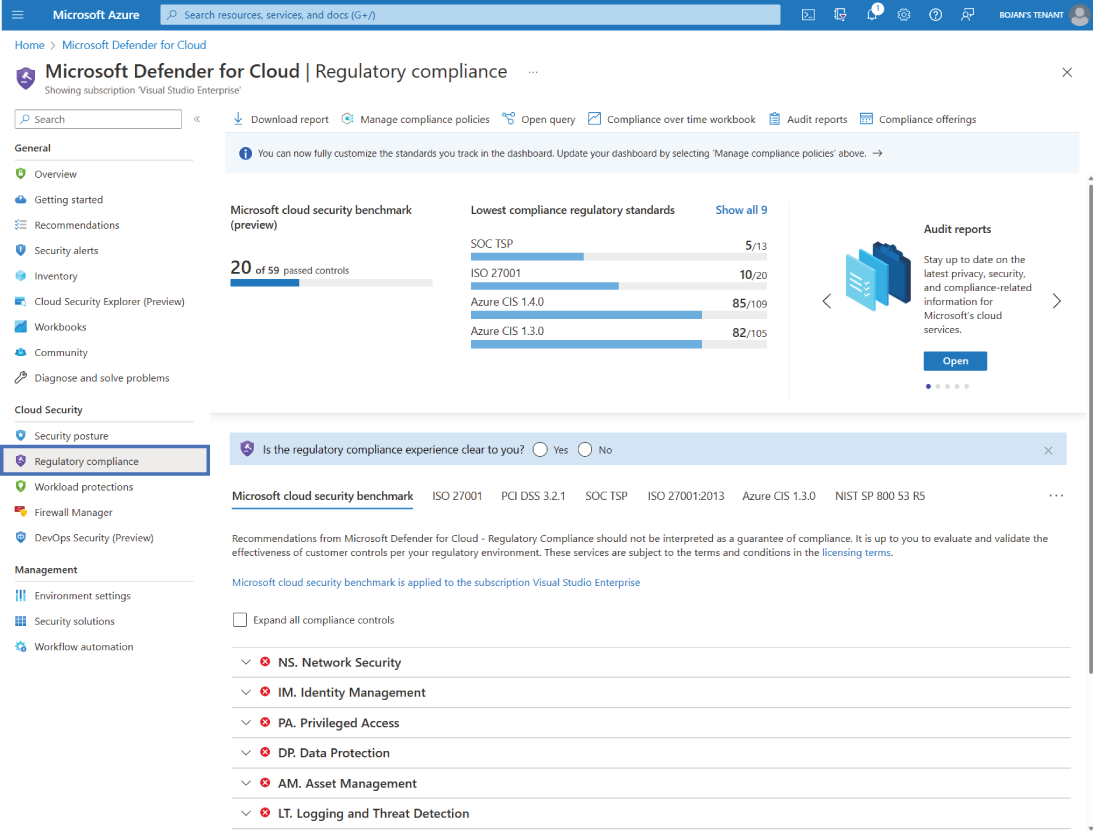
The Regulatory Compliance dashboard organizes standards and highlights failing controls, providing a starting point for drilling into recommendations and affected resources. section 6.5.1











