A control point determines the shape and direction of a Bézier curve without generally lying on the curve. It provides a practical way to bend graph edges while retaining precise geometric control. section 15.4.3 section 16.1.2
Choose the number and placement of control points according to the required flexibility:
- A quadratic Bézier curve uses two endpoints and one control point. Repeated linear interpolation between these points generates the curve. section 15.4.3
- A cubic Bézier curve uses two endpoints and two control points, providing more flexibility but requiring more parameters. section 16.1.2
- For a symmetric quadratic curve, place the control point on the perpendicular bisector of the endpoint segment; its signed distance from that segment becomes the main shape parameter. section 16.1.2 section 15.4.4
Modeling a curved graph edge
For an edge between vertices u and v, select a quadratic control point C on the line perpendicular to uv through its midpoint. Store the signed distance d from C to uv: changing d bends the edge to either side, while restricting its magnitude keeps the curve’s shape manageable. section 16.1.2 section 15.4.4
Figure 16.6 A quadratic Bézier curve used to draw an edge between vertices u and v. The point C is the curve’s control point. For this example, we restrict to a subset of all the possible quadratic Bézier curves between two points, and in particular to just those curves where the control point lies on the line perpendicular to the segment uv, and passing through the middle of the segment (in other words, the line made by points in the plane that are at the same distance to u and v).
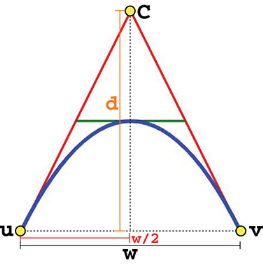
Use the geometric figure to see how a control point on the perpendicular bisector shapes a quadratic edge between two vertices. section 16.1.2



