A control point shapes a Bézier curve without usually sitting on the curve itself. Think of it as a magnet or handle: move it, and the path bends toward it. As the parameter t moves from 0 to 1, each point’s influence changes predictably, producing a smooth path from the fixed start to the fixed end. section 11.1.2
A quadratic Bézier curve has one control point, so that point affects the whole curve. A cubic curve has two: the first shapes how the curve leaves its start, and the second shapes how it approaches its end. This independent start-and-end control makes cubic curves useful for animation timing. section 11.1.3 section 11.1.4
In a CSS timing function, the endpoints are fixed and the two inner control points control motion:
- P₁ (x1, y1) controls the beginning: x1 changes when acceleration begins, while y1 changes how strongly it starts. section 11.2.2
- P₂ (x2, y2) controls the ending: x2 changes when deceleration begins, while y2 changes the final approach. section 11.2.2
- Keep x1 and x2 between 0 and 1. Letting y-values fall below 0 creates anticipation; values above 1 create overshoot. section 11.2.1
Make a toggle finish gently
Use cubic-bezier(0.2, 0.9, 0.1, 1.0) on a transform transition. Its steep early slope produces a fast start, while its flatter ending lets the toggle settle slowly. Control points change progress over time, not the start or final transform values. section 11.2.1 section 11.1.4
Figure 11.2 The cubic Bézier curve defined by cubic-bezier(0.2, 0.9, 0.1, 1.0)
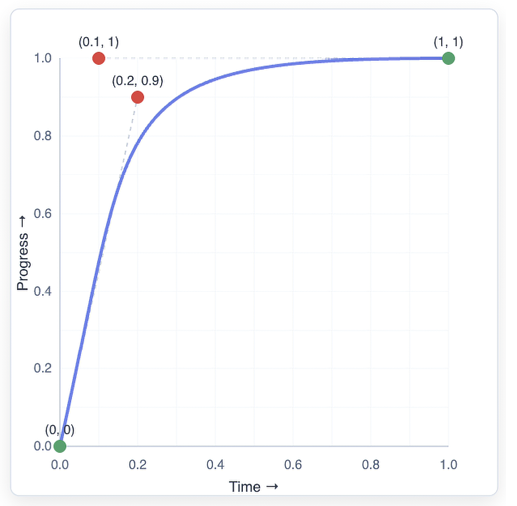
Inspect the plotted curve for cubic-bezier(0.2, 0.9, 0.1, 1.0) to connect the two inner control points with a quick start and gentle finish. section 11.2.1



