liveBook · Manning

Control point

As explained in How Computers Make Books

A control point is a point whose position determines how a Bézier curve deviates from the line between its endpoints.

A control point is an adjustable point that pulls a Bézier curve away from the straight line between its endpoints. A typical curve has two control points, one associated with each endpoint; moving them farther away increases the curve’s deviation. The curve may bend one way, two ways, or not at all. section 2.2

Shaping a letter

A designer can move control points interactively to build curved lines, then stitch several curves together into paths. An ampersand uses three such paths: one for its main shape and two for its holes. Aligning neighboring control points at 180° can make a join smooth. section 2.2

Figure 2.5 Several Bézier curves and their control points (shown as black dots)
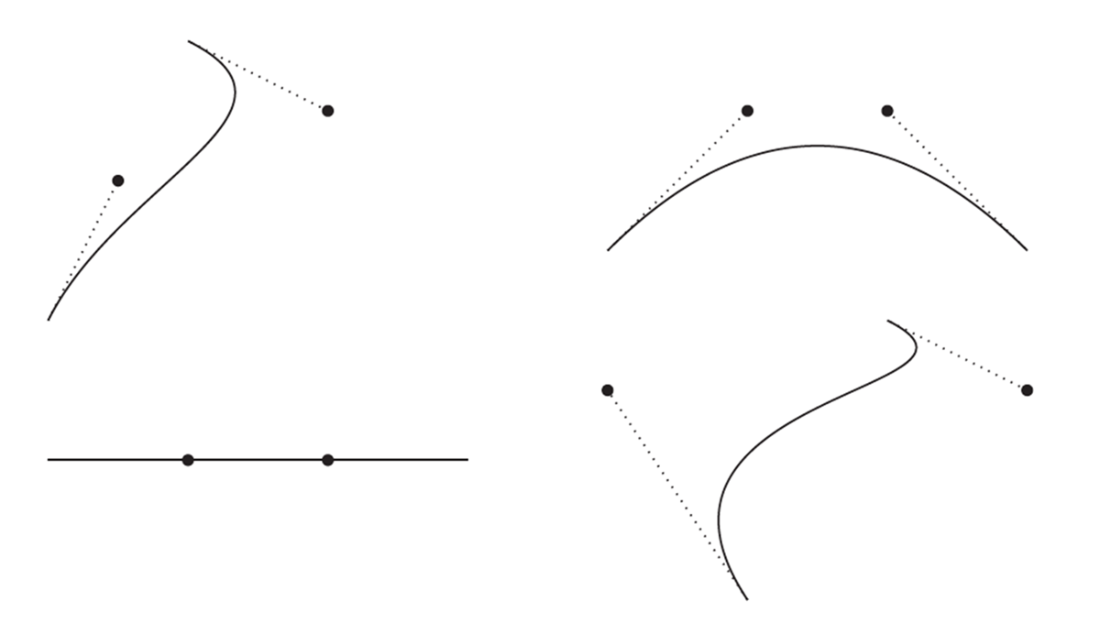
Compare several Bézier curves and see how their black-dot control points change the curves’ shapes. section 2.2


How How Computers Make Books covers it

How deep it goes
Defines control points and their visual effect, then sketches smooth joins without developing the underlying mathematics.
Examples
Uses interactive curve editing, chained curves forming an ampersand, and control-point alignment for smooth joins.
What you can do after
Apply it via an interactive graphics program to adjust Bézier curves and create connected letterform paths.
How it connects
Connects control points to Bézier curves, endpoints, paths, and smooth curve joins.

Also explained in

Compare how 4 books explain control point →

Related concepts

This explainer was generated by Manning's knowledge graph from the text of How Computers Make Books. The section links point to the parts of the book it draws on.

